> ## Documentation Index
> Fetch the complete documentation index at: https://help-plum.xoxoday.com/llms.txt
> Use this file to discover all available pages before exploring further.

# Create Reward Code Campaign

*Learn how to create a Reward Code Campaign*

Plum lets you customize Reward Code Campaigns with tailored storefronts and custom landing pages for enhanced user engagement and redemption experiences.

***

## Creating a Reward Code Campaign
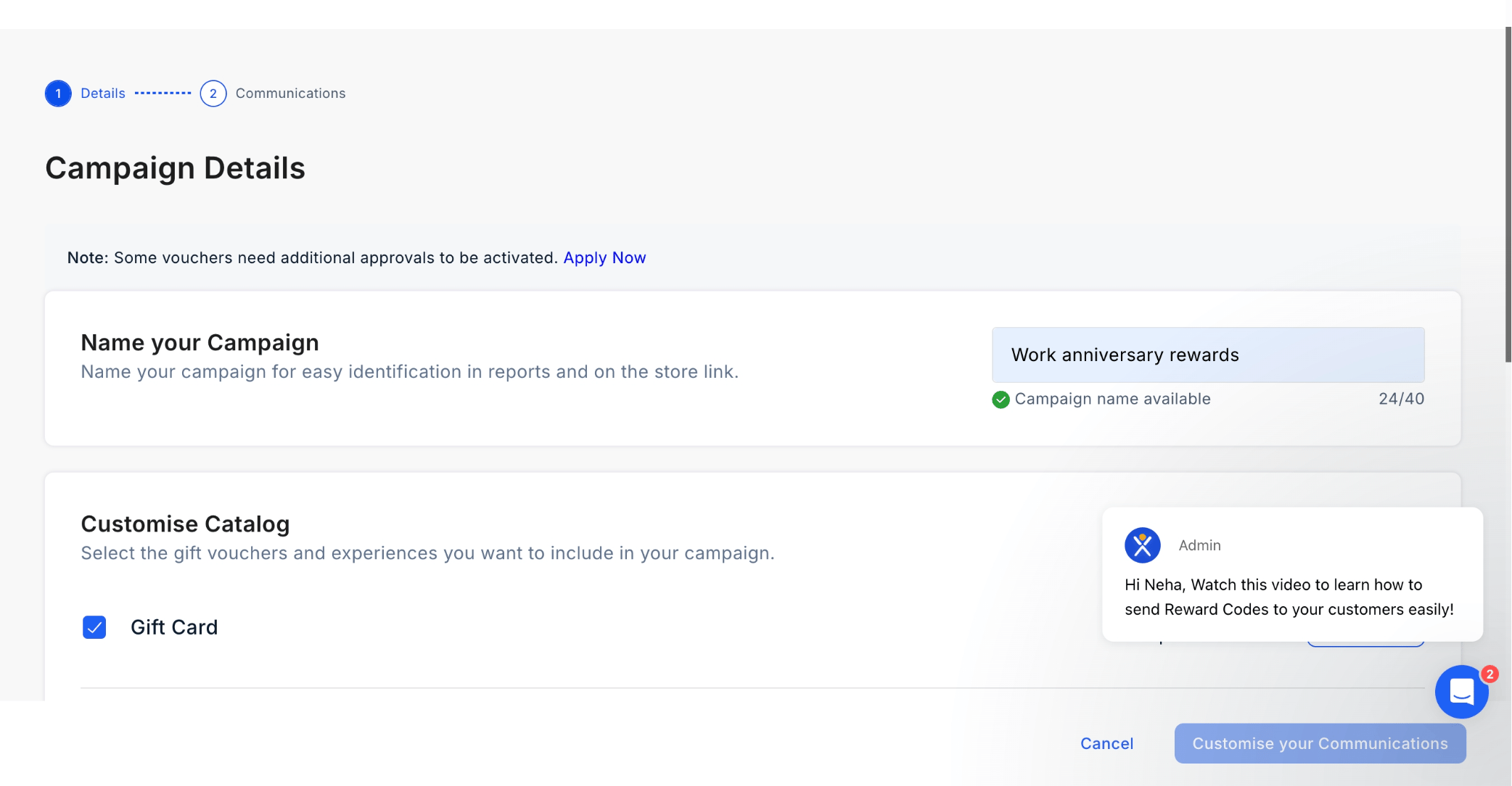
<img src="https://mintcdn.com/plum/kNcyLek1bA74PNJE/images/intercom/help-center-campaigns-create-a-reward-code-campaign-10225615/b646a4b08f76641d7e5616c32dccade48649562d504c6a2d1eb8e5a88ab64c4d-screenshot_-_2025-04-07T161422_825.png?fit=max&auto=format&n=kNcyLek1bA74PNJE&q=85&s=9e7a92b7cb31dc3d25d8c72c1f54a02b" alt="Customize Catalog" width="2084" height="1084" data-path="images/intercom/help-center-campaigns-create-a-reward-code-campaign-10225615/b646a4b08f76641d7e5616c32dccade48649562d504c6a2d1eb8e5a88ab64c4d-screenshot_-_2025-04-07T161422_825.png" />

<img src="https://mintcdn.com/plum/kNcyLek1bA74PNJE/images/intercom/help-center-campaigns-create-a-reward-code-campaign-10225615/253bd40933869a60f07d0bc487a7271d96c93a905b9242fa25df8c5b0c3207b5-screenshot_-_2025-04-07T161502_837.png?fit=max&auto=format&n=kNcyLek1bA74PNJE&q=85&s=0ba8be382696ff86d338b4920e5e6f15" alt="" width="2084" height="1084" data-path="images/intercom/help-center-campaigns-create-a-reward-code-campaign-10225615/253bd40933869a60f07d0bc487a7271d96c93a905b9242fa25df8c5b0c3207b5-screenshot_-_2025-04-07T161502_837.png" />

<img src="https://mintcdn.com/plum/kNcyLek1bA74PNJE/images/intercom/help-center-campaigns-create-a-reward-code-campaign-10225615/screenshot__28_.png?fit=max&auto=format&n=kNcyLek1bA74PNJE&q=85&s=73780f6860f77462ed1b3978f2d05877" alt="" width="2560" height="1294" data-path="images/intercom/help-center-campaigns-create-a-reward-code-campaign-10225615/screenshot__28_.png" />

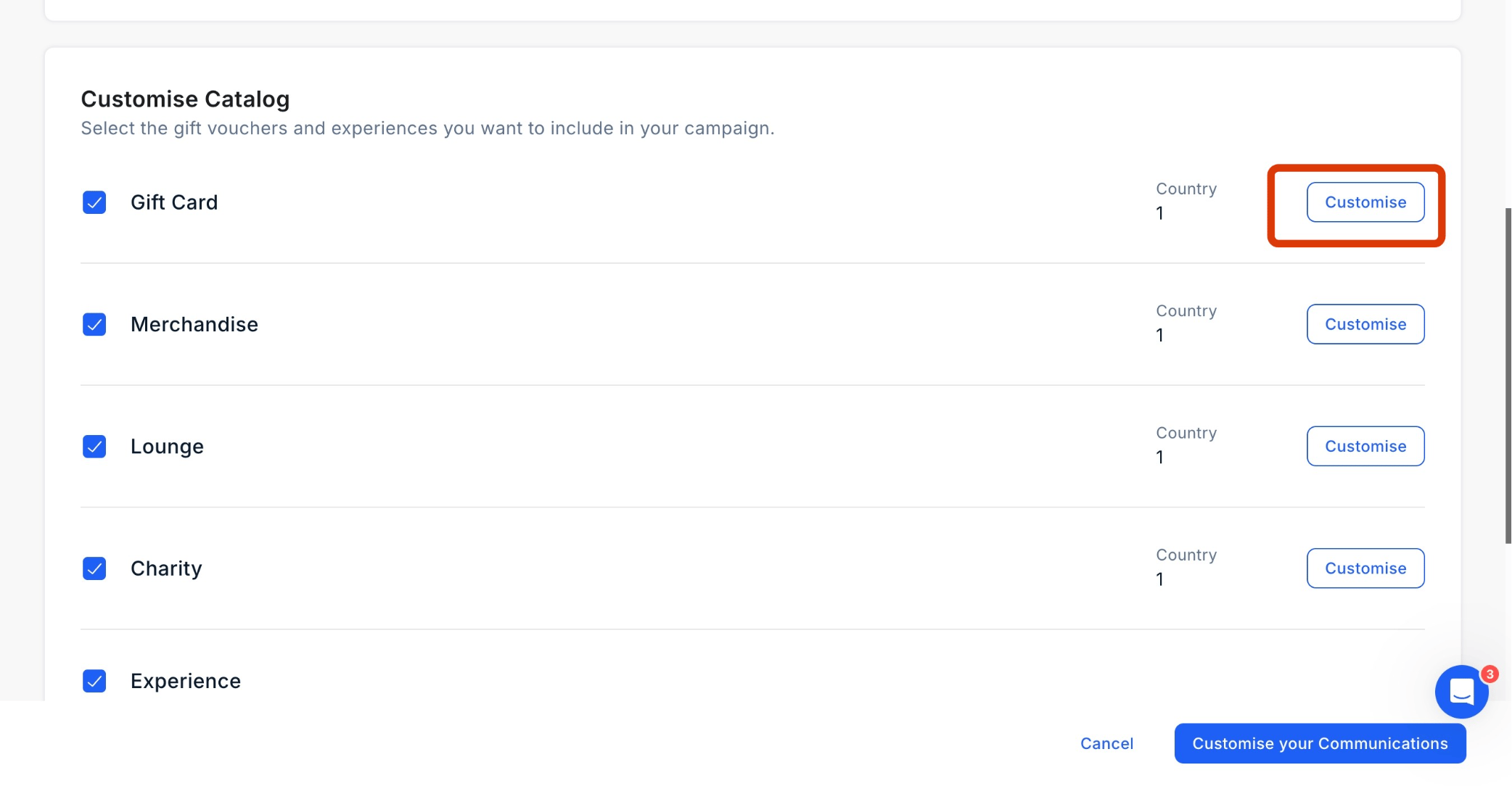
Customize Catalog

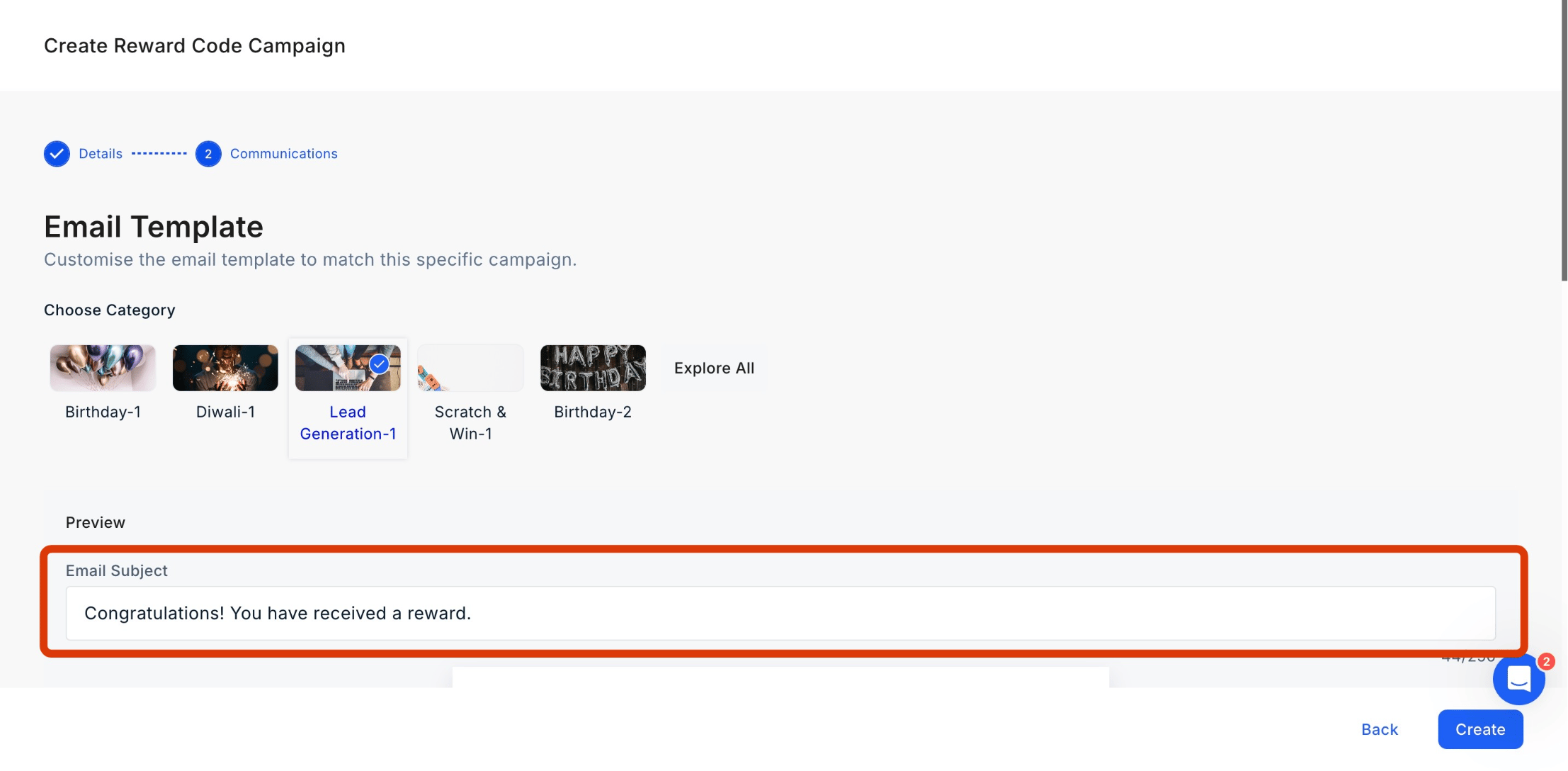
Customize the email subject and content to align with your campaign goals.
<img src="https://mintcdn.com/plum/kNcyLek1bA74PNJE/images/intercom/help-center-campaigns-create-a-reward-code-campaign-10225615/screenshot_-_2025-04-08T121657_836.png?fit=max&auto=format&n=kNcyLek1bA74PNJE&q=85&s=3bc59363ca3cf818ff5d89e687ec07ec" alt="" width="2214" height="1088" data-path="images/intercom/help-center-campaigns-create-a-reward-code-campaign-10225615/screenshot_-_2025-04-08T121657_836.png" />

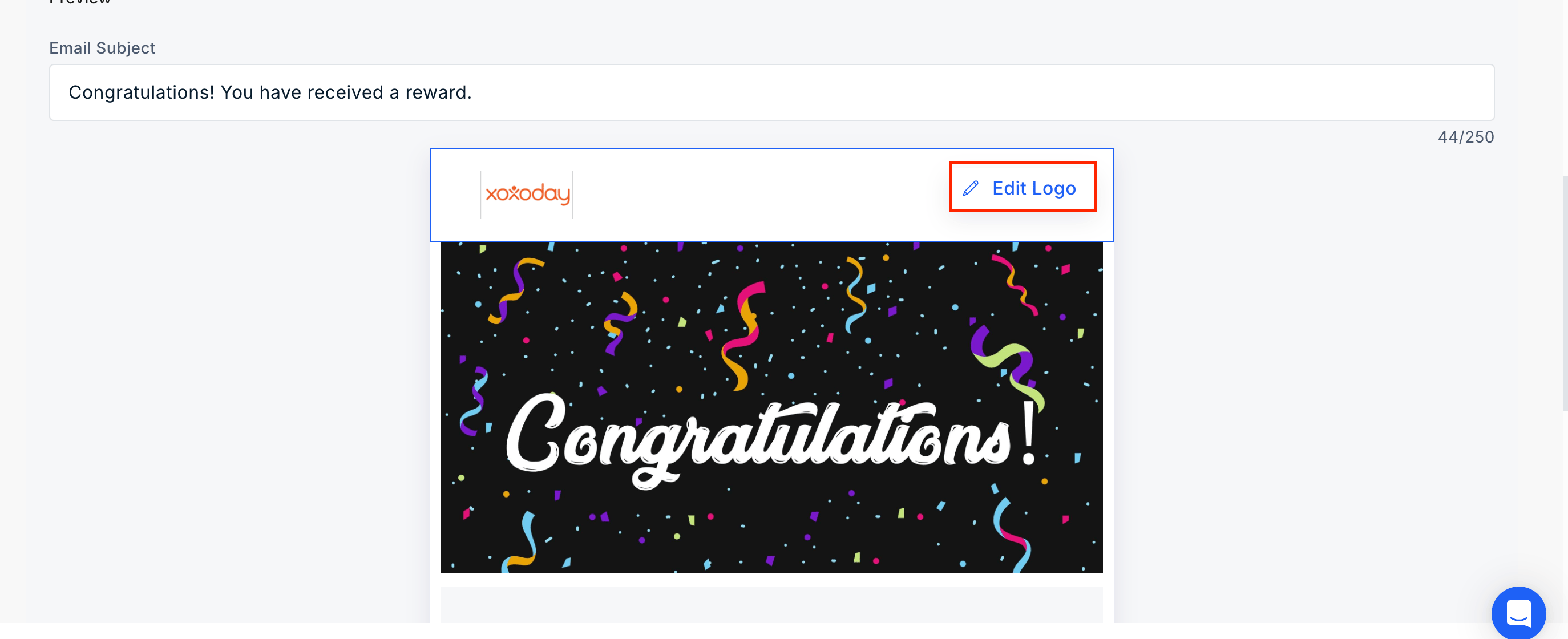
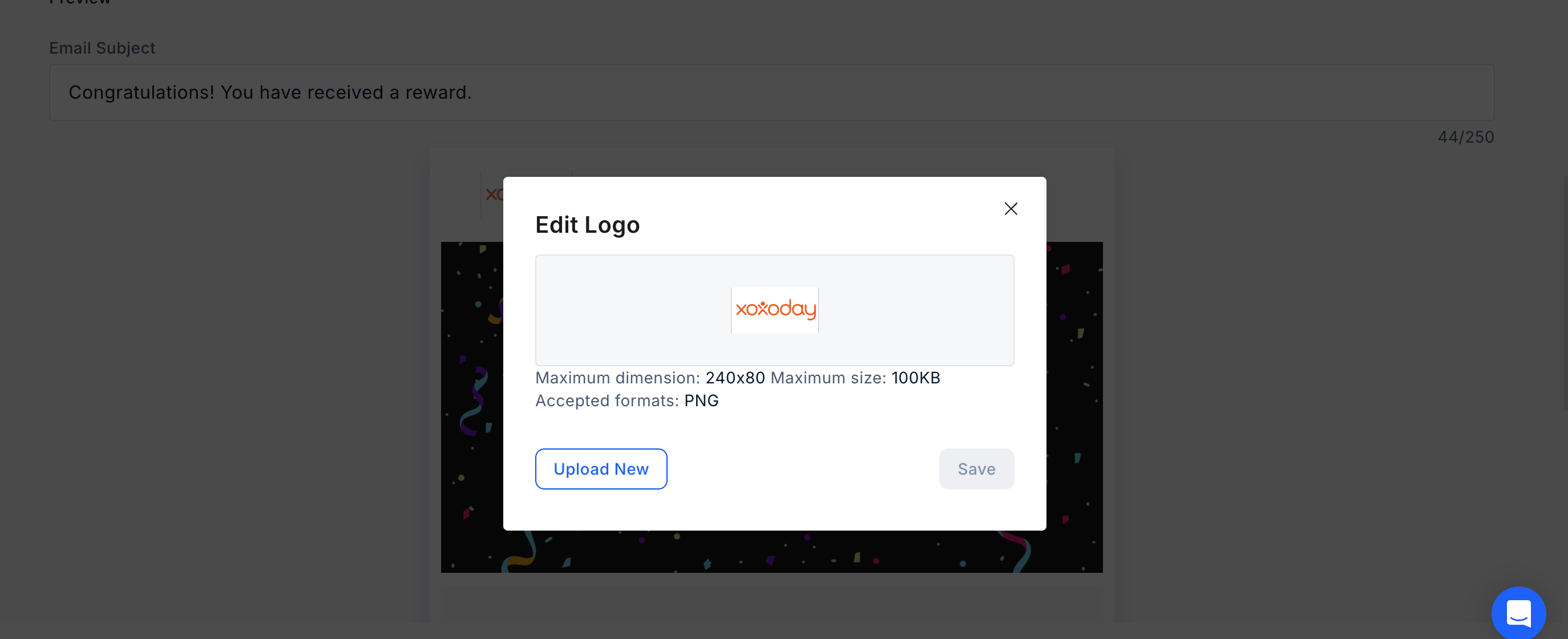
<img src="https://mintcdn.com/plum/kNcyLek1bA74PNJE/images/intercom/help-center-campaigns-create-a-reward-code-campaign-10225615/screenshot_-_2025-04-08T121657_836.png?fit=max&auto=format&n=kNcyLek1bA74PNJE&q=85&s=3bc59363ca3cf818ff5d89e687ec07ec" width="2214" height="1088" data-path="images/intercom/help-center-campaigns-create-a-reward-code-campaign-10225615/screenshot_-_2025-04-08T121657_836.png" />- You can also edit the logo by clicking on "Edit Logo" and uploading a new logo.

* You can also edit the logo by clicking on "Edit Logo" and uploading a new logo.
<img src="https://mintcdn.com/plum/kNcyLek1bA74PNJE/images/intercom/help-center-campaigns-create-a-reward-code-campaign-10225615/Screenshot_2025-12-24_at_1_36_39_PM.png?fit=max&auto=format&n=kNcyLek1bA74PNJE&q=85&s=8521656c56812583459a1b1cc3d2a3af" alt="" width="2748" height="1120" data-path="images/intercom/help-center-campaigns-create-a-reward-code-campaign-10225615/Screenshot_2025-12-24_at_1_36_39_PM.png" />

<img src="https://mintcdn.com/plum/kNcyLek1bA74PNJE/images/intercom/help-center-campaigns-create-a-reward-code-campaign-10225615/Screenshot_2025-12-24_at_1_36_58_PM.png?fit=max&auto=format&n=kNcyLek1bA74PNJE&q=85&s=591e7067d73886ae865a3ca2721504fd" alt="" width="2748" height="1120" data-path="images/intercom/help-center-campaigns-create-a-reward-code-campaign-10225615/Screenshot_2025-12-24_at_1_36_58_PM.png" />

* Xoxoday Plum allows for editing or removing the banner. Click on "**Edit/Remove Banner**" and follow the steps.

<img src="https://mintcdn.com/plum/kNcyLek1bA74PNJE/images/intercom/help-center-campaigns-create-a-reward-code-campaign-10225615/Screenshot_2025-12-24_at_1_37_08_PM.png?fit=max&auto=format&n=kNcyLek1bA74PNJE&q=85&s=fa45094bf1de4c20f91c20e8b25d65df" width="2748" height="1120" data-path="images/intercom/help-center-campaigns-create-a-reward-code-campaign-10225615/Screenshot_2025-12-24_at_1_37_08_PM.png" />- Click on "Edit Message" to make changes to the message.

<img src="https://mintcdn.com/plum/kNcyLek1bA74PNJE/images/intercom/help-center-campaigns-create-a-reward-code-campaign-10225615/Screenshot_2025-12-24_at_1_37_23_PM.png?fit=max&auto=format&n=kNcyLek1bA74PNJE&q=85&s=514156890f49cd05d93f067aae75e96a" width="2748" height="1120" data-path="images/intercom/help-center-campaigns-create-a-reward-code-campaign-10225615/Screenshot_2025-12-24_at_1_37_23_PM.png" />#

<img src="https://mintcdn.com/plum/kNcyLek1bA74PNJE/images/intercom/help-center-campaigns-create-a-reward-code-campaign-10225615/Screenshot_2025-12-24_at_1_37_08_PM.png?fit=max&auto=format&n=kNcyLek1bA74PNJE&q=85&s=fa45094bf1de4c20f91c20e8b25d65df" alt="" width="2748" height="1120" data-path="images/intercom/help-center-campaigns-create-a-reward-code-campaign-10225615/Screenshot_2025-12-24_at_1_37_08_PM.png" />

* Click on "Edit Message" to make changes to the message.

<img src="https://mintcdn.com/plum/kNcyLek1bA74PNJE/images/intercom/help-center-campaigns-create-a-reward-code-campaign-10225615/Screenshot_2025-12-24_at_1_37_23_PM.png?fit=max&auto=format&n=kNcyLek1bA74PNJE&q=85&s=514156890f49cd05d93f067aae75e96a" alt="" width="2748" height="1120" data-path="images/intercom/help-center-campaigns-create-a-reward-code-campaign-10225615/Screenshot_2025-12-24_at_1_37_23_PM.png" />

* **Configure Message Details** Toggle the recipient's name on or off and choose from our library of greetings (or create a custom one). Define your message by entering a title and body text, then adjust the content alignment to your preference.

<img src="https://mintcdn.com/plum/kNcyLek1bA74PNJE/images/intercom/help-center-campaigns-create-a-reward-code-campaign-10225615/Screenshot_2025-12-24_at_1_37_34_PM.png?fit=max&auto=format&n=kNcyLek1bA74PNJE&q=85&s=69b8a31cc70066b8d573d46434027aa9" alt="" width="2732" height="1238" data-path="images/intercom/help-center-campaigns-create-a-reward-code-campaign-10225615/Screenshot_2025-12-24_at_1_37_34_PM.png" />

## \*\*​Step 6: Setting Up the Campaign

<img src="https://mintcdn.com/plum/kNcyLek1bA74PNJE/images/intercom/help-center-campaigns-create-a-reward-code-campaign-10225615/Screenshot_2025-12-24_at_1_37_34_PM.png?fit=max&auto=format&n=kNcyLek1bA74PNJE&q=85&s=69b8a31cc70066b8d573d46434027aa9" width="2732" height="1238" data-path="images/intercom/help-center-campaigns-create-a-reward-code-campaign-10225615/Screenshot_2025-12-24_at_1_37_34_PM.png" />## **​Step 6: Setting Up the Campaign Once all configurations are complete, click "Create**" to launch your Reward Code Campaign. Once all configurations are complete, click "Create\*\*" to launch your Reward Code Campaign.

<img src="https://mintcdn.com/plum/kNcyLek1bA74PNJE/images/intercom/help-center-campaigns-create-a-reward-code-campaign-10225615/screenshot_-_2025-04-08T121713_576.png?fit=max&auto=format&n=kNcyLek1bA74PNJE&q=85&s=514b69fa3674cb7d5739e6c436f232cb" alt="" width="2214" height="1088" data-path="images/intercom/help-center-campaigns-create-a-reward-code-campaign-10225615/screenshot_-_2025-04-08T121713_576.png" />

<Steps>
  <Step title="Navigation">
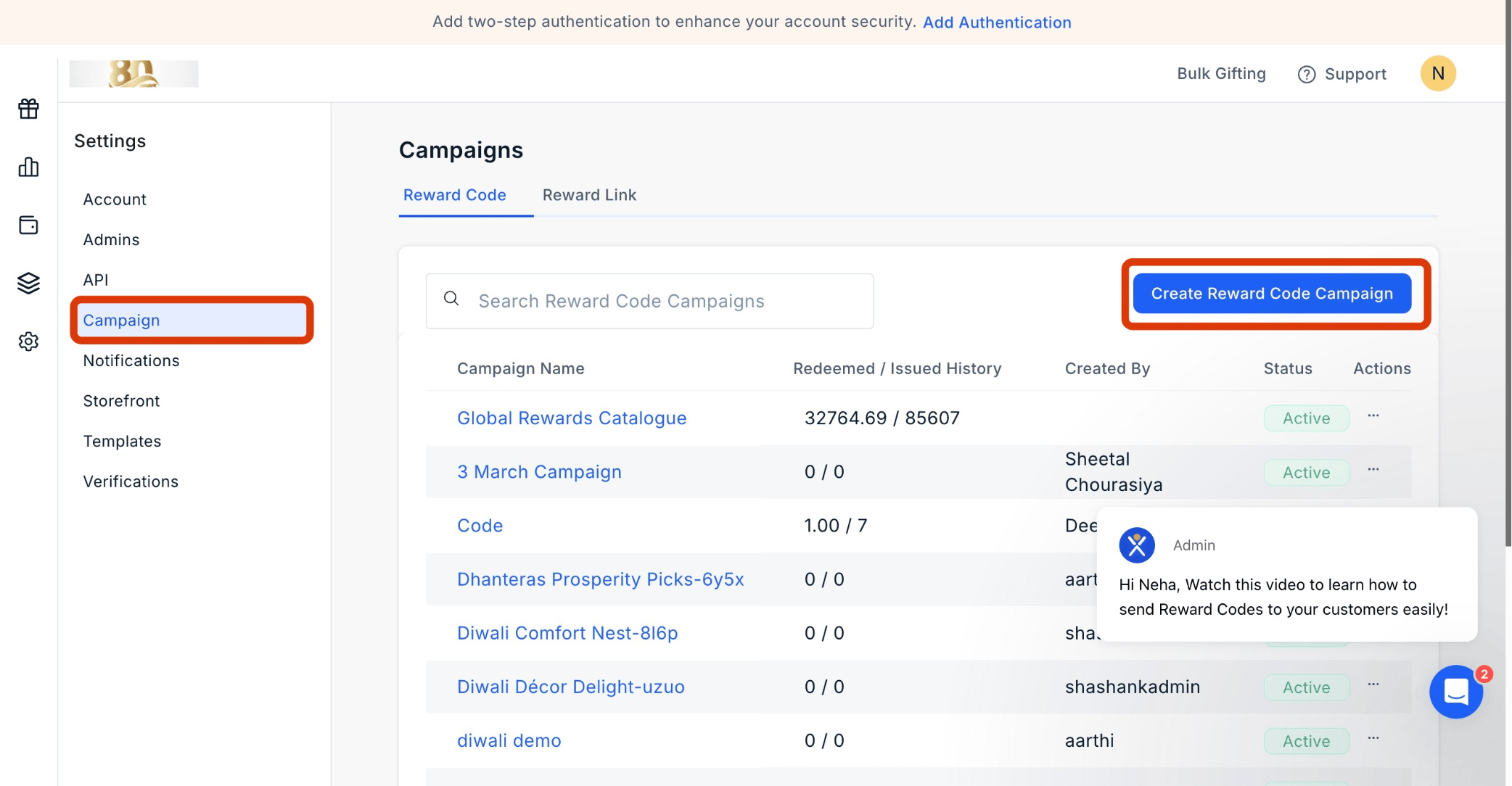
    Navigate to Settings > Campaigns, select Reward Code and click "**Create Reward Code Campaign**."

    <Frame>
      <img src="https://mintcdn.com/plum/kNcyLek1bA74PNJE/images/intercom/help-center-campaigns-create-a-reward-code-campaign-10225615/b43f12961889dbde612197518a5a87cbf148293a354a5077d7de101391b45bcb-screenshot_-_2025-04-07T153438_953.png?fit=max&auto=format&n=kNcyLek1bA74PNJE&q=85&s=2304725a086cbec33cc882fa430ffae1" alt="Customize Catalog" width="2084" height="1084" data-path="images/intercom/help-center-campaigns-create-a-reward-code-campaign-10225615/b43f12961889dbde612197518a5a87cbf148293a354a5077d7de101391b45bcb-screenshot_-_2025-04-07T153438_953.png" />
    </Frame>
  </Step>

  <Step title="Naming the Campaign">
    Start by giving your campaign a name. You can then choose the specific categories you wish to include or exclude.

    <Frame>
      <img src="https://mintcdn.com/plum/kNcyLek1bA74PNJE/images/intercom/help-center-campaigns-create-a-reward-code-campaign-10225615/b646a4b08f76641d7e5616c32dccade48649562d504c6a2d1eb8e5a88ab64c4d-screenshot_-_2025-04-07T161422_825.png?fit=max&auto=format&n=kNcyLek1bA74PNJE&q=85&s=9e7a92b7cb31dc3d25d8c72c1f54a02b" alt="Customize Catalog" width="2084" height="1084" data-path="images/intercom/help-center-campaigns-create-a-reward-code-campaign-10225615/b646a4b08f76641d7e5616c32dccade48649562d504c6a2d1eb8e5a88ab64c4d-screenshot_-_2025-04-07T161422_825.png" />
    </Frame>
  </Step>

  <Step title="Customizing the Storefront">
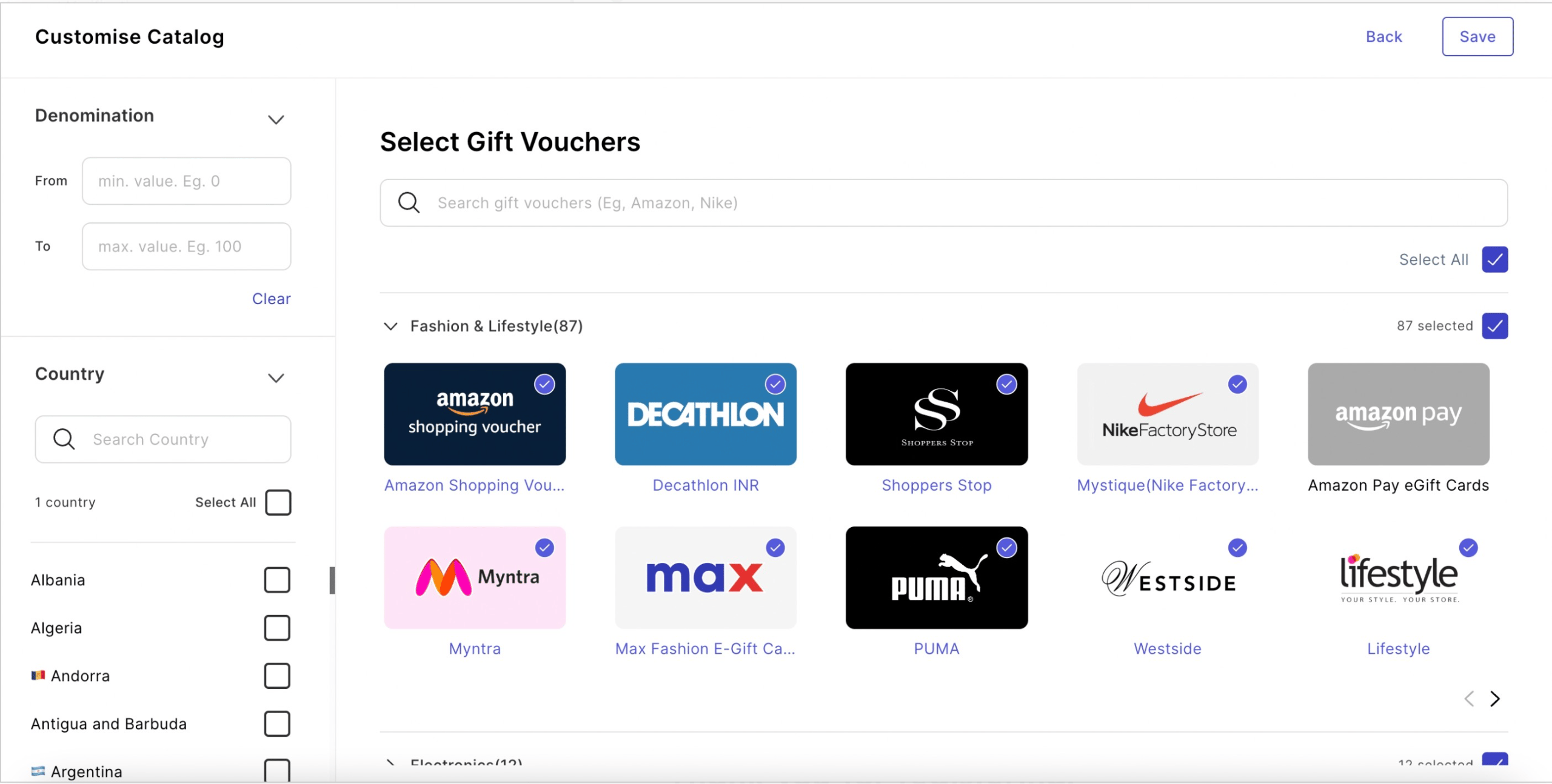
    Utilize the campaign to tailor the storefront for your end-users. This customization encompasses options such as country, brand, and categories. Once adjustments are made, remember to save the changes.

    <Frame>
      <img src="https://mintcdn.com/plum/kNcyLek1bA74PNJE/images/intercom/help-center-campaigns-create-a-reward-code-campaign-10225615/253bd40933869a60f07d0bc487a7271d96c93a905b9242fa25df8c5b0c3207b5-screenshot_-_2025-04-07T161502_837.png?fit=max&auto=format&n=kNcyLek1bA74PNJE&q=85&s=0ba8be382696ff86d338b4920e5e6f15" alt="" width="2084" height="1084" data-path="images/intercom/help-center-campaigns-create-a-reward-code-campaign-10225615/253bd40933869a60f07d0bc487a7271d96c93a905b9242fa25df8c5b0c3207b5-screenshot_-_2025-04-07T161502_837.png" />
    </Frame>

    <Frame>
      <img src="https://mintcdn.com/plum/kNcyLek1bA74PNJE/images/intercom/help-center-campaigns-create-a-reward-code-campaign-10225615/screenshot__28_.png?fit=max&auto=format&n=kNcyLek1bA74PNJE&q=85&s=73780f6860f77462ed1b3978f2d05877" alt="" width="2560" height="1294" data-path="images/intercom/help-center-campaigns-create-a-reward-code-campaign-10225615/screenshot__28_.png" />
    </Frame>

    Customize Catalog
  </Step>

  <Step title="Adding a Custom Landing Page">
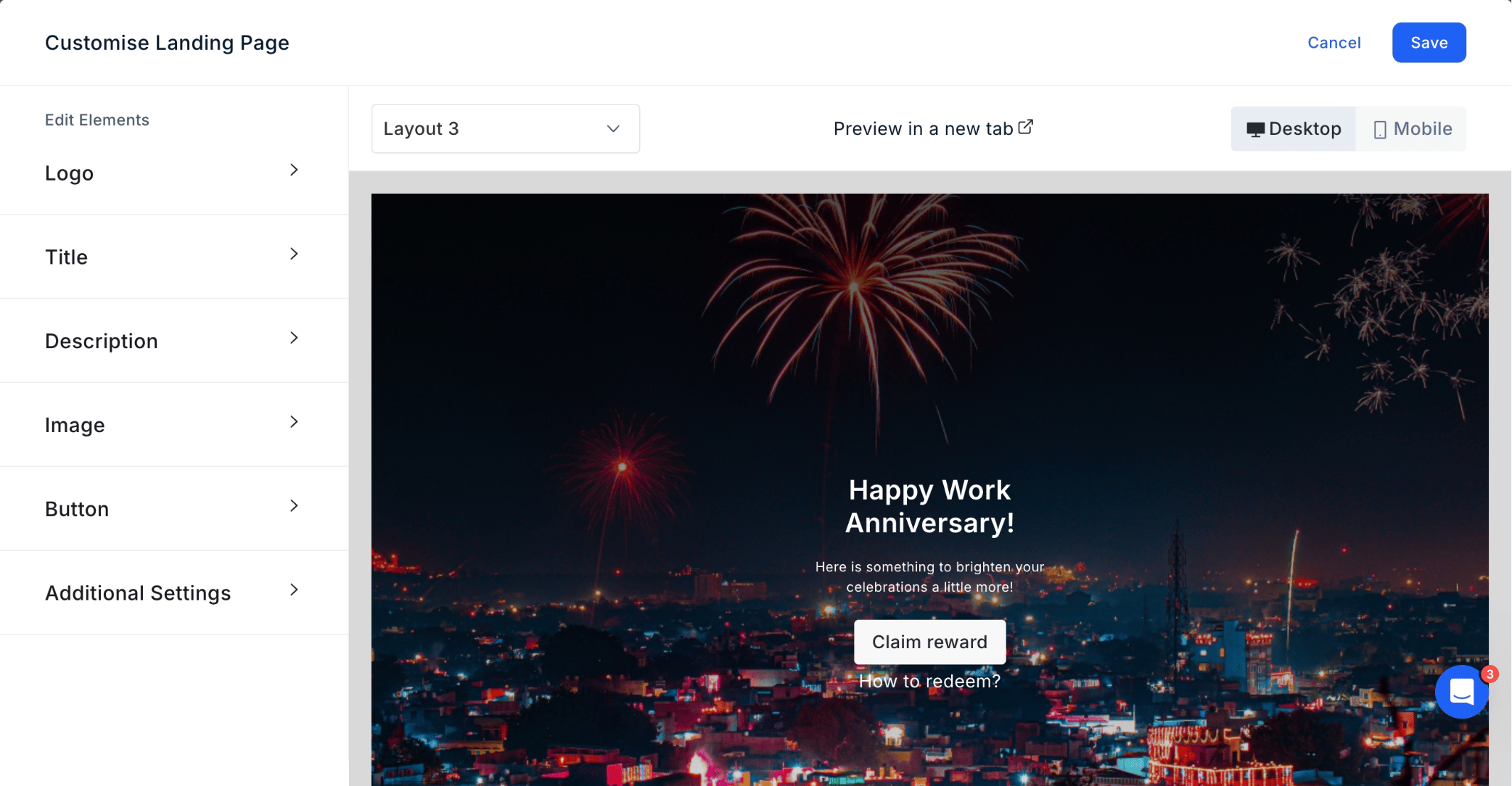
    Enhance personalization by incorporating a custom landing page. When recipients receive the reward code, they will first encounter this landing page before being directed to the storefront for redemption.

    <Frame>
      <img src="https://mintcdn.com/plum/kNcyLek1bA74PNJE/images/intercom/help-center-campaigns-create-a-reward-code-campaign-10225615/448195e2f29b710db93aecc59f043d04bbd943818d5f02ae5545467b3ff20af5-screenshot_-_2025-04-07T161640_483.png?fit=max&auto=format&n=kNcyLek1bA74PNJE&q=85&s=8b74641f0b228e0af5e89a3dd1392e05" alt="" width="2084" height="1084" data-path="images/intercom/help-center-campaigns-create-a-reward-code-campaign-10225615/448195e2f29b710db93aecc59f043d04bbd943818d5f02ae5545467b3ff20af5-screenshot_-_2025-04-07T161640_483.png" />
    </Frame>
  </Step>

  <Step title="Add the Email Subject and Content">
    <Frame>
      <img src="https://mintcdn.com/plum/kNcyLek1bA74PNJE/images/intercom/help-center-campaigns-create-a-reward-code-campaign-10225615/b646a4b08f76641d7e5616c32dccade48649562d504c6a2d1eb8e5a88ab64c4d-screenshot_-_2025-04-07T161422_825.png?fit=max&auto=format&n=kNcyLek1bA74PNJE&q=85&s=9e7a92b7cb31dc3d25d8c72c1f54a02b" alt="Customize Catalog" width="2084" height="1084" data-path="images/intercom/help-center-campaigns-create-a-reward-code-campaign-10225615/b646a4b08f76641d7e5616c32dccade48649562d504c6a2d1eb8e5a88ab64c4d-screenshot_-_2025-04-07T161422_825.png" />
    </Frame>

    <Frame>
      <img src="https://mintcdn.com/plum/kNcyLek1bA74PNJE/images/intercom/help-center-campaigns-create-a-reward-code-campaign-10225615/253bd40933869a60f07d0bc487a7271d96c93a905b9242fa25df8c5b0c3207b5-screenshot_-_2025-04-07T161502_837.png?fit=max&auto=format&n=kNcyLek1bA74PNJE&q=85&s=0ba8be382696ff86d338b4920e5e6f15" alt="" width="2084" height="1084" data-path="images/intercom/help-center-campaigns-create-a-reward-code-campaign-10225615/253bd40933869a60f07d0bc487a7271d96c93a905b9242fa25df8c5b0c3207b5-screenshot_-_2025-04-07T161502_837.png" />
    </Frame>

    <Frame>
      <img src="https://mintcdn.com/plum/kNcyLek1bA74PNJE/images/intercom/help-center-campaigns-create-a-reward-code-campaign-10225615/screenshot__28_.png?fit=max&auto=format&n=kNcyLek1bA74PNJE&q=85&s=73780f6860f77462ed1b3978f2d05877" alt="" width="2560" height="1294" data-path="images/intercom/help-center-campaigns-create-a-reward-code-campaign-10225615/screenshot__28_.png" />
    </Frame>

    Customize Catalog

    Customize the email subject and content to align with your campaign goals.

    <Frame>
      <img src="https://mintcdn.com/plum/kNcyLek1bA74PNJE/images/intercom/help-center-campaigns-create-a-reward-code-campaign-10225615/screenshot_-_2025-04-08T121657_836.png?fit=max&auto=format&n=kNcyLek1bA74PNJE&q=85&s=3bc59363ca3cf818ff5d89e687ec07ec" alt="" width="2214" height="1088" data-path="images/intercom/help-center-campaigns-create-a-reward-code-campaign-10225615/screenshot_-_2025-04-08T121657_836.png" />
    </Frame>

    <Frame>
      <img src="https://mintcdn.com/plum/kNcyLek1bA74PNJE/images/intercom/help-center-campaigns-create-a-reward-code-campaign-10225615/screenshot_-_2025-04-08T121657_836.png?fit=max&auto=format&n=kNcyLek1bA74PNJE&q=85&s=3bc59363ca3cf818ff5d89e687ec07ec" alt="" width="2214" height="1088" data-path="images/intercom/help-center-campaigns-create-a-reward-code-campaign-10225615/screenshot_-_2025-04-08T121657_836.png" />
    </Frame>

    * You can also edit the logo by clicking on "Edit Logo" and uploading a new logo.
    * You can also edit the logo by clicking on "Edit Logo" and uploading a new logo.
    <Frame>
      <img src="https://mintcdn.com/plum/kNcyLek1bA74PNJE/images/intercom/help-center-campaigns-create-a-reward-code-campaign-10225615/Screenshot_2025-12-24_at_1_36_39_PM.png?fit=max&auto=format&n=kNcyLek1bA74PNJE&q=85&s=8521656c56812583459a1b1cc3d2a3af" alt="" width="2748" height="1120" data-path="images/intercom/help-center-campaigns-create-a-reward-code-campaign-10225615/Screenshot_2025-12-24_at_1_36_39_PM.png" />
    </Frame>

    <Frame>
      <img src="https://mintcdn.com/plum/kNcyLek1bA74PNJE/images/intercom/help-center-campaigns-create-a-reward-code-campaign-10225615/Screenshot_2025-12-24_at_1_36_58_PM.png?fit=max&auto=format&n=kNcyLek1bA74PNJE&q=85&s=591e7067d73886ae865a3ca2721504fd" alt="" width="2748" height="1120" data-path="images/intercom/help-center-campaigns-create-a-reward-code-campaign-10225615/Screenshot_2025-12-24_at_1_36_58_PM.png" />
    </Frame>

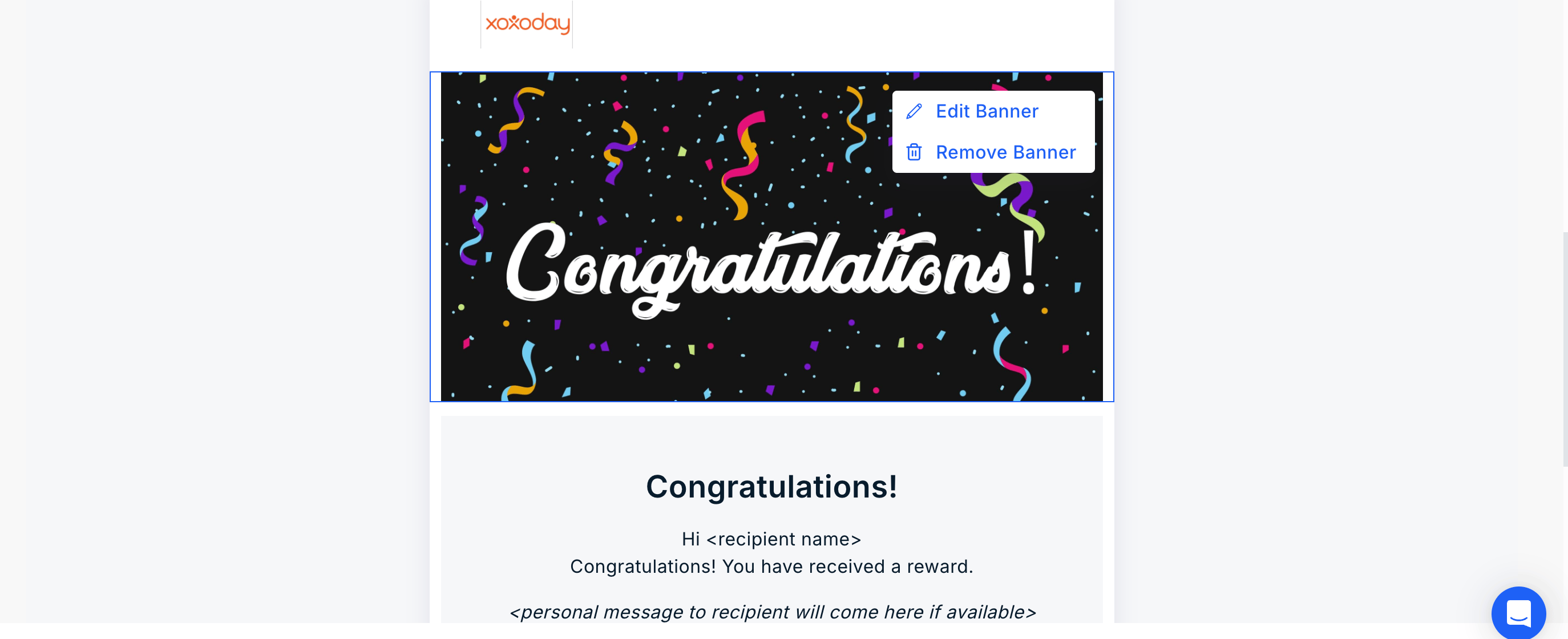
    * Xoxoday Plum allows for editing or removing the banner. Click on "**Edit/Remove Banner**" and follow the steps.
    <Frame>
      <img src="https://mintcdn.com/plum/kNcyLek1bA74PNJE/images/intercom/help-center-campaigns-create-a-reward-code-campaign-10225615/Screenshot_2025-12-24_at_1_37_08_PM.png?fit=max&auto=format&n=kNcyLek1bA74PNJE&q=85&s=fa45094bf1de4c20f91c20e8b25d65df" alt="" width="2748" height="1120" data-path="images/intercom/help-center-campaigns-create-a-reward-code-campaign-10225615/Screenshot_2025-12-24_at_1_37_08_PM.png" />
    </Frame>

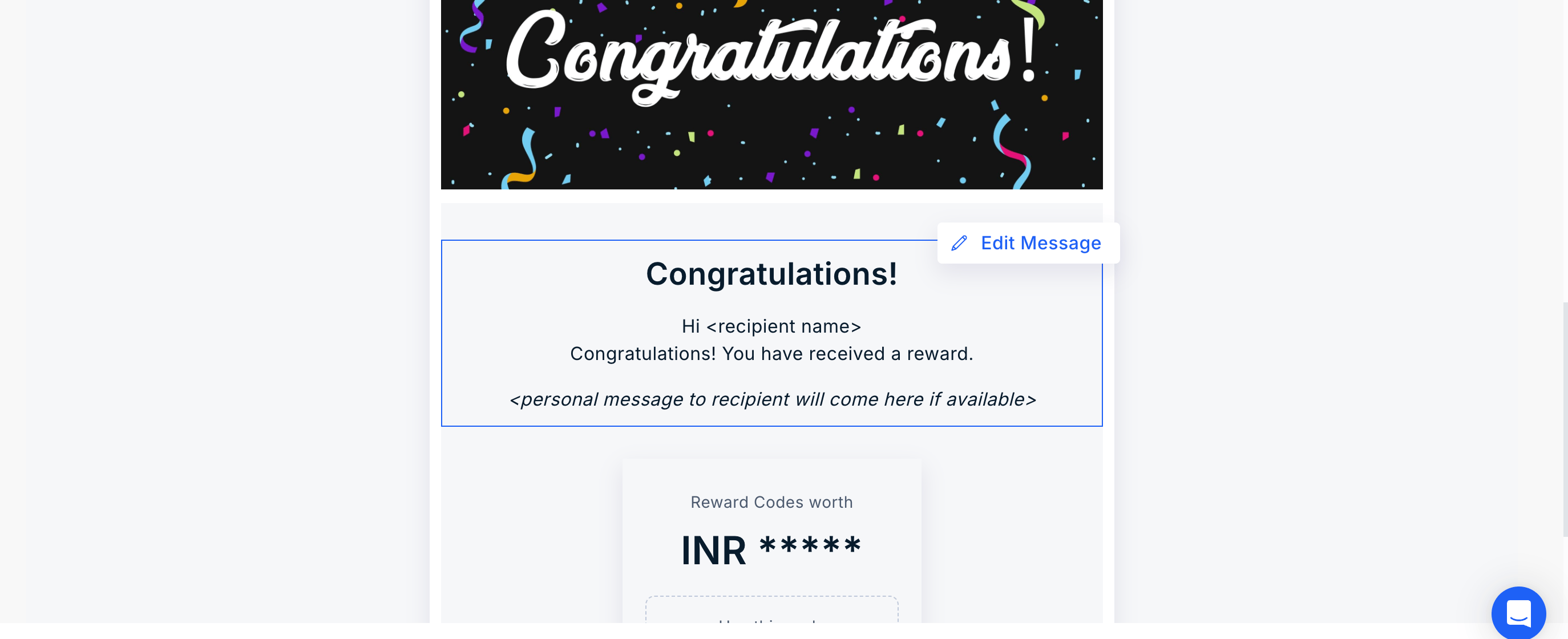
    * Click on "Edit Message" to make changes to the message.
    <Frame>
      <img src="https://mintcdn.com/plum/kNcyLek1bA74PNJE/images/intercom/help-center-campaigns-create-a-reward-code-campaign-10225615/Screenshot_2025-12-24_at_1_37_23_PM.png?fit=max&auto=format&n=kNcyLek1bA74PNJE&q=85&s=514156890f49cd05d93f067aae75e96a" alt="" width="2748" height="1120" data-path="images/intercom/help-center-campaigns-create-a-reward-code-campaign-10225615/Screenshot_2025-12-24_at_1_37_23_PM.png" />
    </Frame>

    <Frame>
      <img src="https://mintcdn.com/plum/kNcyLek1bA74PNJE/images/intercom/help-center-campaigns-create-a-reward-code-campaign-10225615/Screenshot_2025-12-24_at_1_37_08_PM.png?fit=max&auto=format&n=kNcyLek1bA74PNJE&q=85&s=fa45094bf1de4c20f91c20e8b25d65df" alt="" width="2748" height="1120" data-path="images/intercom/help-center-campaigns-create-a-reward-code-campaign-10225615/Screenshot_2025-12-24_at_1_37_08_PM.png" />
    </Frame>

    * Click on "Edit Message" to make changes to the message.

    <Frame>
      <img src="https://mintcdn.com/plum/kNcyLek1bA74PNJE/images/intercom/help-center-campaigns-create-a-reward-code-campaign-10225615/Screenshot_2025-12-24_at_1_37_23_PM.png?fit=max&auto=format&n=kNcyLek1bA74PNJE&q=85&s=514156890f49cd05d93f067aae75e96a" alt="" width="2748" height="1120" data-path="images/intercom/help-center-campaigns-create-a-reward-code-campaign-10225615/Screenshot_2025-12-24_at_1_37_23_PM.png" />
    </Frame>

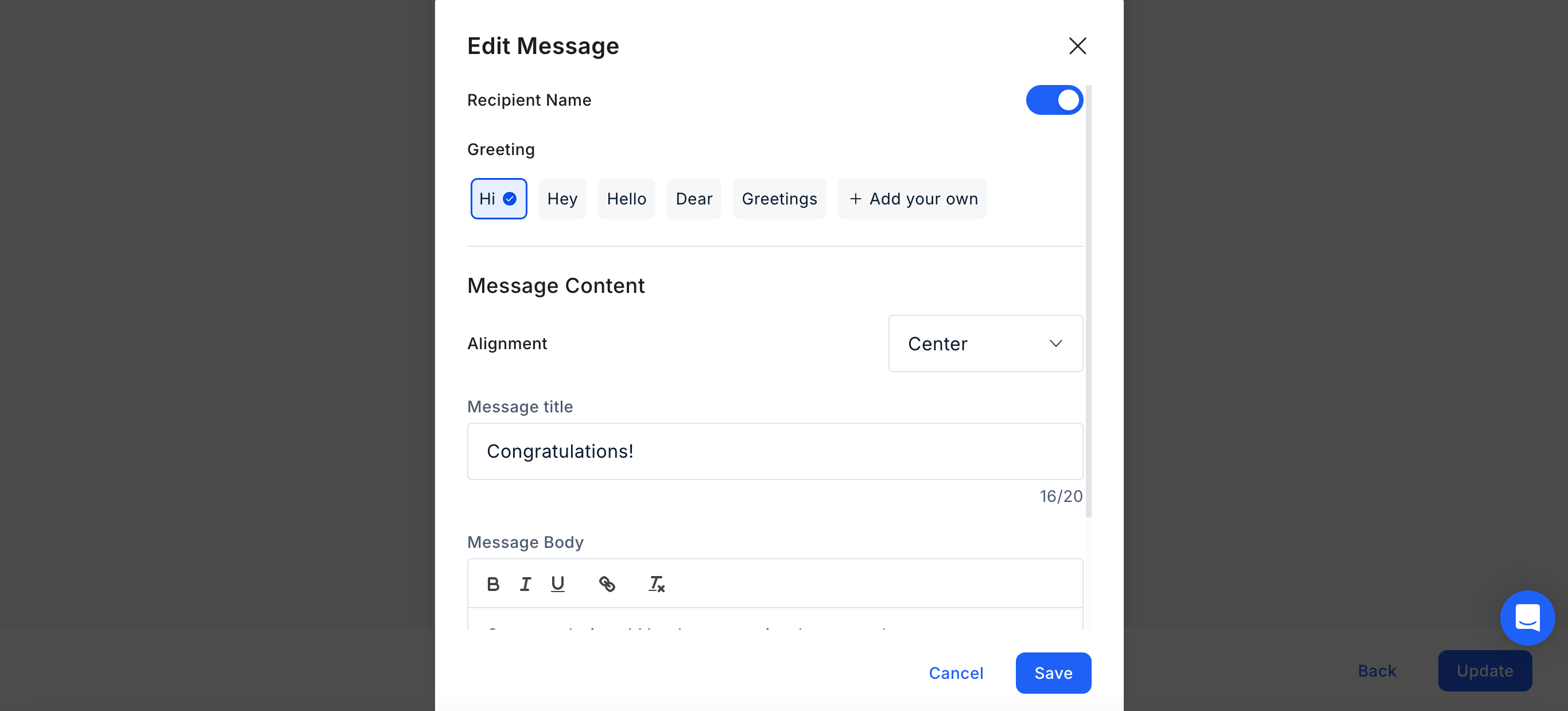
    * **Configure Message Details** Toggle the recipient's name on or off and choose from our library of greetings (or create a custom one). Define your message by entering a title and body text, then adjust the content alignment to your preference.
    <Frame>
      <img src="https://mintcdn.com/plum/kNcyLek1bA74PNJE/images/intercom/help-center-campaigns-create-a-reward-code-campaign-10225615/Screenshot_2025-12-24_at_1_37_34_PM.png?fit=max&auto=format&n=kNcyLek1bA74PNJE&q=85&s=69b8a31cc70066b8d573d46434027aa9" alt="" width="2732" height="1238" data-path="images/intercom/help-center-campaigns-create-a-reward-code-campaign-10225615/Screenshot_2025-12-24_at_1_37_34_PM.png" />
    </Frame>
  </Step>

  <Step title="Setting Up the Campaign">
    <Frame>
      <img src="https://mintcdn.com/plum/kNcyLek1bA74PNJE/images/intercom/help-center-campaigns-create-a-reward-code-campaign-10225615/Screenshot_2025-12-24_at_1_37_34_PM.png?fit=max&auto=format&n=kNcyLek1bA74PNJE&q=85&s=69b8a31cc70066b8d573d46434027aa9" alt="" width="2732" height="1238" data-path="images/intercom/help-center-campaigns-create-a-reward-code-campaign-10225615/Screenshot_2025-12-24_at_1_37_34_PM.png" />
    </Frame>

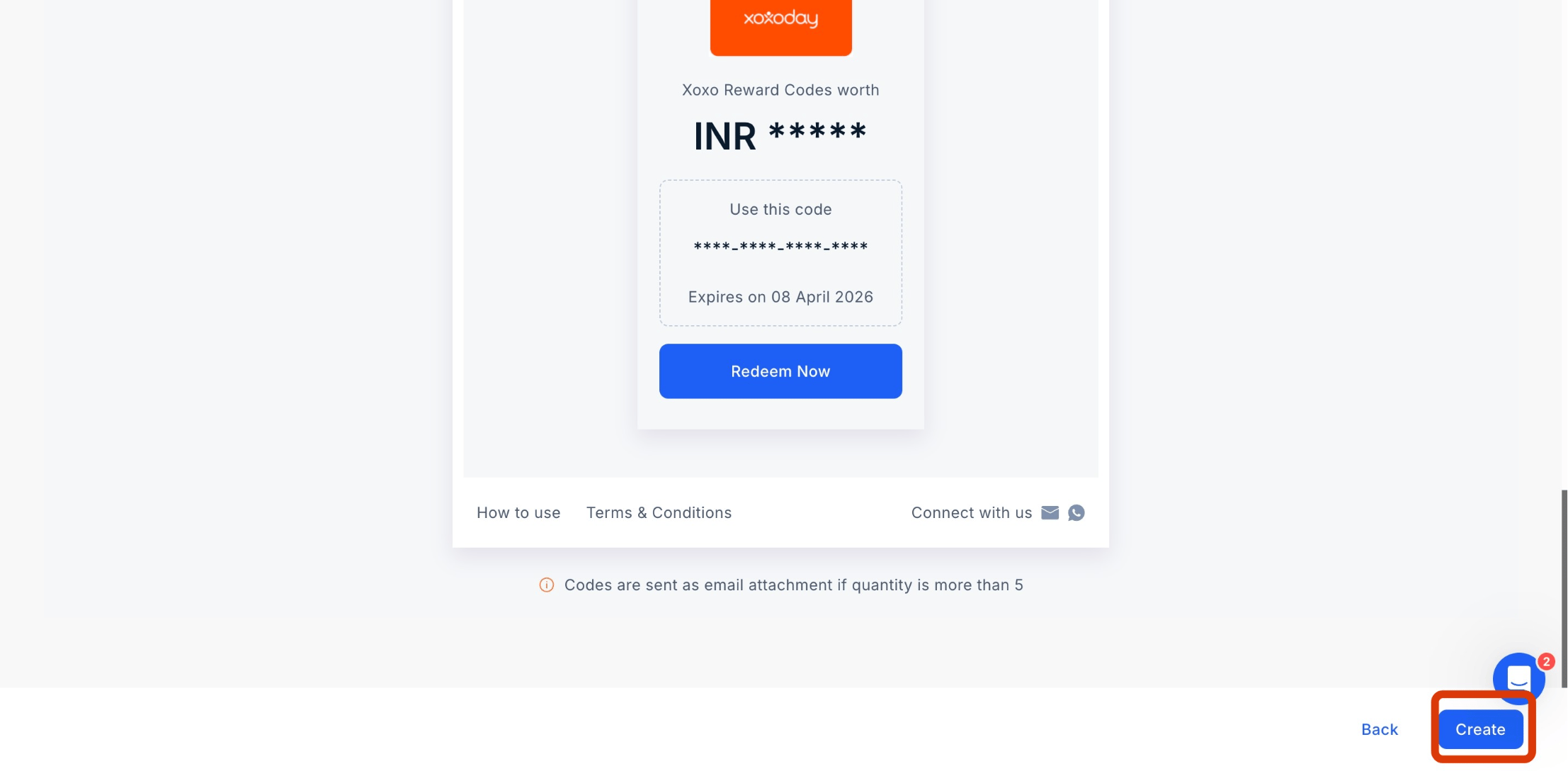
    Once all configurations are complete, click "**Create**" to launch your Reward Code Campaign. Once all configurations are complete, click "**Create**" to launch your Reward Code Campaign.
    <Frame>
      <img src="https://mintcdn.com/plum/kNcyLek1bA74PNJE/images/intercom/help-center-campaigns-create-a-reward-code-campaign-10225615/screenshot_-_2025-04-08T121713_576.png?fit=max&auto=format&n=kNcyLek1bA74PNJE&q=85&s=514b69fa3674cb7d5739e6c436f232cb" alt="" width="2214" height="1088" data-path="images/intercom/help-center-campaigns-create-a-reward-code-campaign-10225615/screenshot_-_2025-04-08T121713_576.png" />
    </Frame>

    <Frame>
      <img src="https://mintcdn.com/plum/kNcyLek1bA74PNJE/images/intercom/help-center-campaigns-create-a-reward-code-campaign-10225615/screenshot_-_2025-04-08T121713_576.png?fit=max&auto=format&n=kNcyLek1bA74PNJE&q=85&s=514b69fa3674cb7d5739e6c436f232cb" alt="" width="2214" height="1088" data-path="images/intercom/help-center-campaigns-create-a-reward-code-campaign-10225615/screenshot_-_2025-04-08T121713_576.png" />
    </Frame>

    Congratulations! You have successfully created a Reward Code Campaign. For any feedback or questions reach out to us at [cs@xoxoday.com](mailto:cs@xoxoday.com). Congratulations! You have successfully created a Reward Code Campaign. For any feedback or questions reach out to us at [cs@xoxoday.com](mailto:cs@xoxoday.com).
  </Step>
</Steps>