> ## Documentation Index
> Fetch the complete documentation index at: https://help-plum.xoxoday.com/llms.txt
> Use this file to discover all available pages before exploring further.

# Automation: Workflow Rules

*Learn all about automating Workflow Rules*

Workflow rules allow you to perform certain automatic actions on specific records based on filter criteria. Using Workflow Automation, you can automate reward sending based on your rules.

## STEP 1: NAVIGATE TO AUTOMATION WORKFLOW RULES

Visit **Setup > Automation > Workflow Rules** for setting workflows.
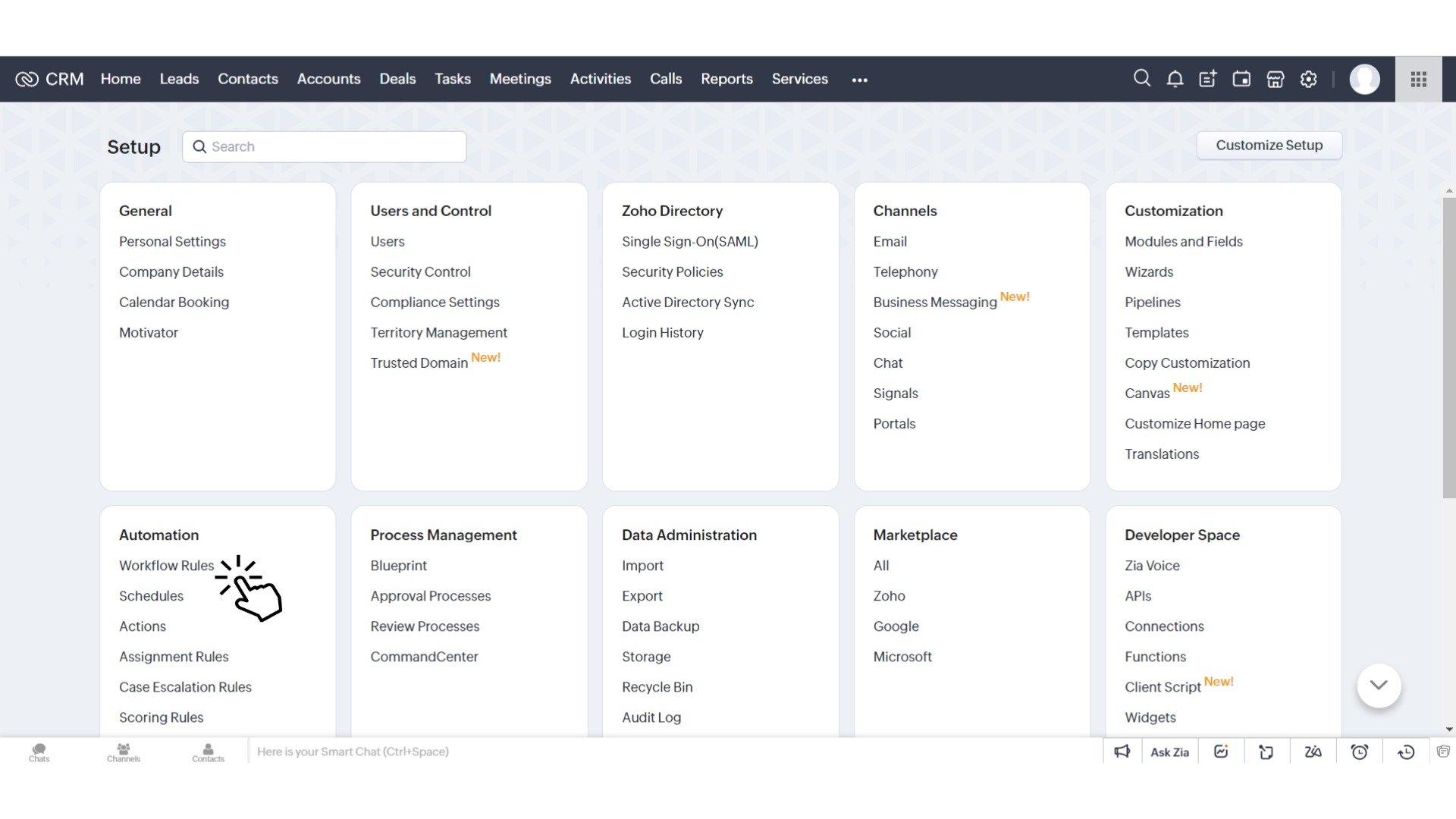
<img src="https://mintcdn.com/plum/zXbsSEper5I-0r-9/images/intercom/help-center-integrations-zoho-crm-automation-workflow-rules-9423153/spaces_-MOeXh7erUO5h_LVpN85_uploads_UXKKNpL7ugXKCVXvin4y_Zoho_CRM_Automation_Workflow_-_Select_Workflow_Rules__1_.jpg?fit=max&auto=format&n=zXbsSEper5I-0r-9&q=85&s=1fa71069e3e593eca93e3911173cc3c7" alt="" width="1920" height="1080" data-path="images/intercom/help-center-integrations-zoho-crm-automation-workflow-rules-9423153/spaces_-MOeXh7erUO5h_LVpN85_uploads_UXKKNpL7ugXKCVXvin4y_Zoho_CRM_Automation_Workflow_-_Select_Workflow_Rules__1_.jpg" />

## STEP 2: CREATING A REWARD WORKFLOW RULE

Click **'Create Rules'** button.
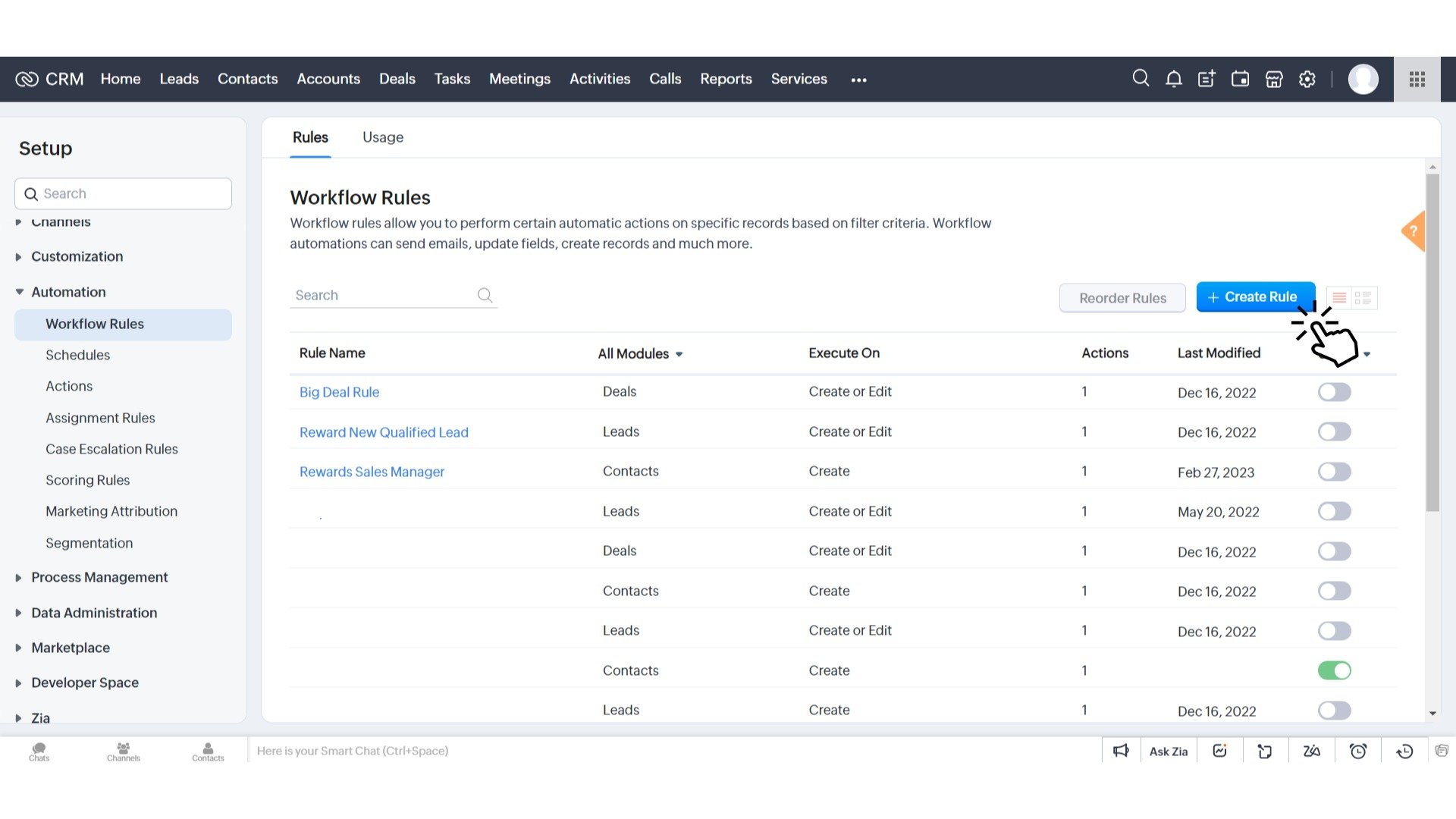
<img src="https://mintcdn.com/plum/zXbsSEper5I-0r-9/images/intercom/help-center-integrations-zoho-crm-automation-workflow-rules-9423153/spaces_-MOeXh7erUO5h_LVpN85_uploads_pzHoZKbliMoC6TUzXu4O_Zoho_CRM_Automation_Workflow__1_.jpg?fit=max&auto=format&n=zXbsSEper5I-0r-9&q=85&s=4d31842d7449b019d4119a54f8543801" alt="" width="1920" height="1080" data-path="images/intercom/help-center-integrations-zoho-crm-automation-workflow-rules-9423153/spaces_-MOeXh7erUO5h_LVpN85_uploads_pzHoZKbliMoC6TUzXu4O_Zoho_CRM_Automation_Workflow__1_.jpg" />

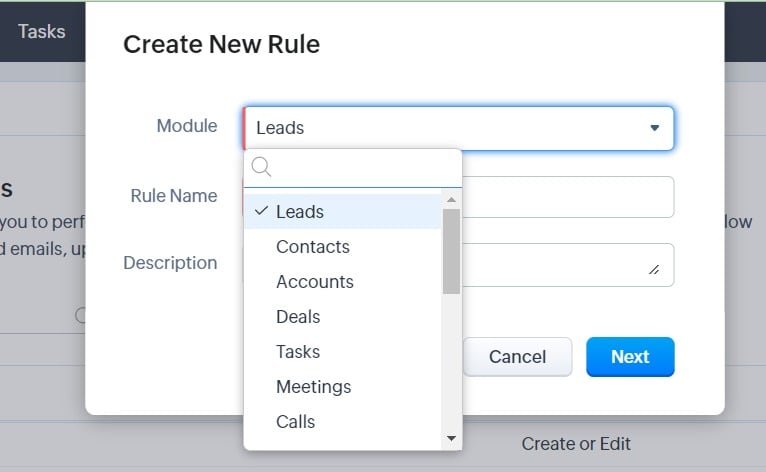
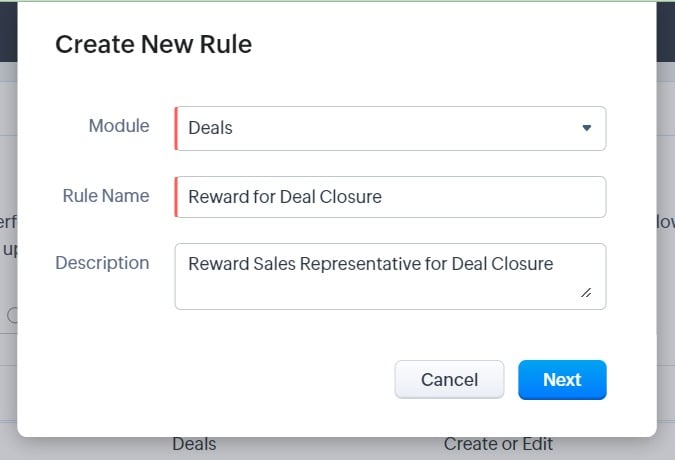
Set the Module for which you want to automate rewards. Add a name to your rule indicating the purpose of reward via name and description.\*\*​

<img src="https://mintcdn.com/plum/zXbsSEper5I-0r-9/images/intercom/help-center-integrations-zoho-crm-automation-workflow-rules-9423153/spaces_-MOeXh7erUO5h_LVpN85_uploads_4O2NGOrK2M3f9Ilg9umX_Untitled__12_.jpg?fit=max&auto=format&n=zXbsSEper5I-0r-9&q=85&s=fd19962095fbabad11a1ad56009132d5" alt="" width="766" height="472" data-path="images/intercom/help-center-integrations-zoho-crm-automation-workflow-rules-9423153/spaces_-MOeXh7erUO5h_LVpN85_uploads_4O2NGOrK2M3f9Ilg9umX_Untitled__12_.jpg" />

<img src="https://mintcdn.com/plum/zXbsSEper5I-0r-9/images/intercom/help-center-integrations-zoho-crm-automation-workflow-rules-9423153/spaces_-MOeXh7erUO5h_LVpN85_uploads_xWUnX85K2zNji5QvDdcy_Untitled__13_.jpg?fit=max&auto=format&n=zXbsSEper5I-0r-9&q=85&s=d89e334519f55d458a62b2b8077c4b13" alt="" width="675" height="460" data-path="images/intercom/help-center-integrations-zoho-crm-automation-workflow-rules-9423153/spaces_-MOeXh7erUO5h_LVpN85_uploads_xWUnX85K2zNji5QvDdcy_Untitled__13_.jpg" />

STEP 3: SET RULES FOR REWARDING
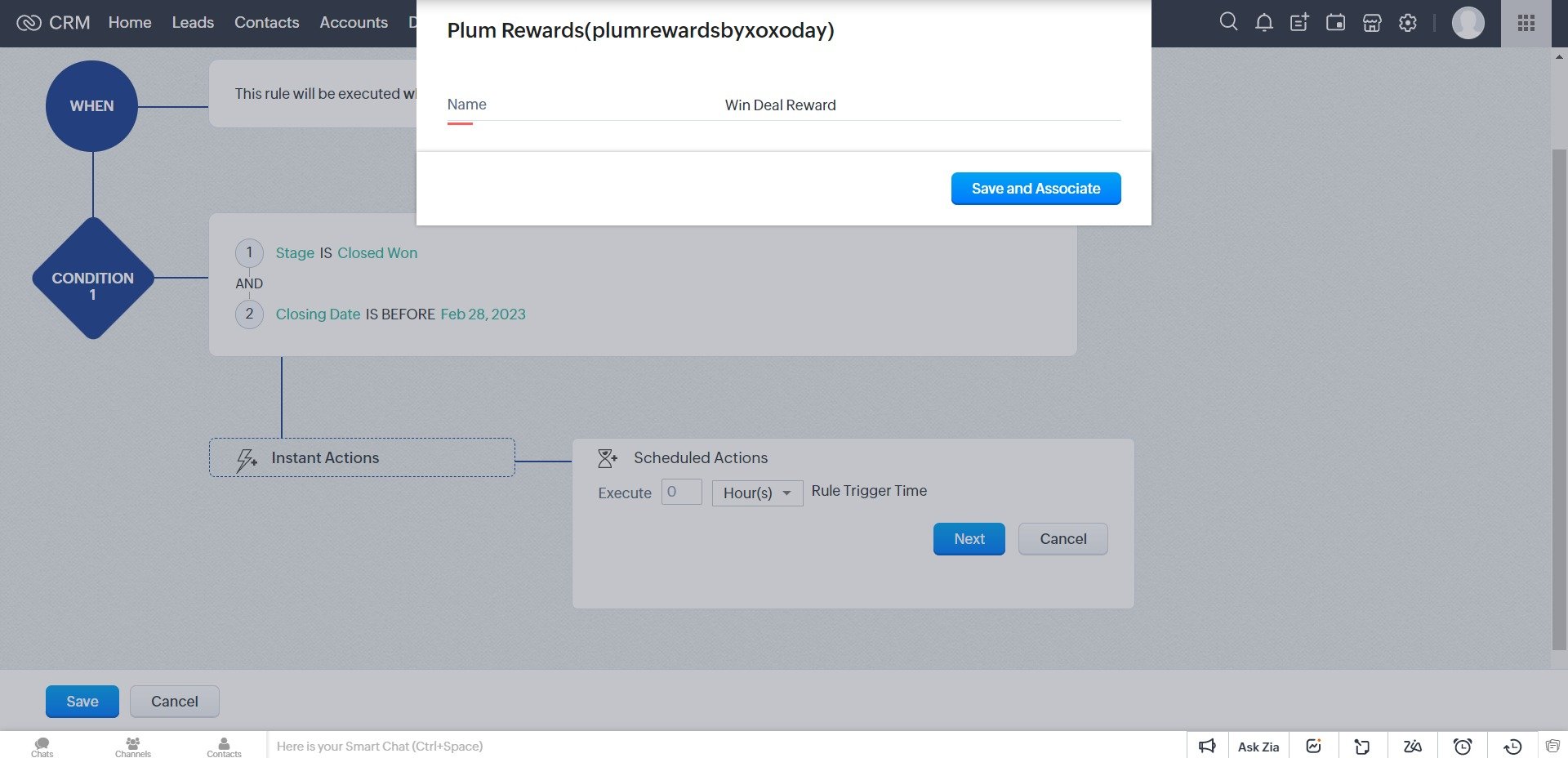
This rules rewards sales representative for winning a deal within a closing date.
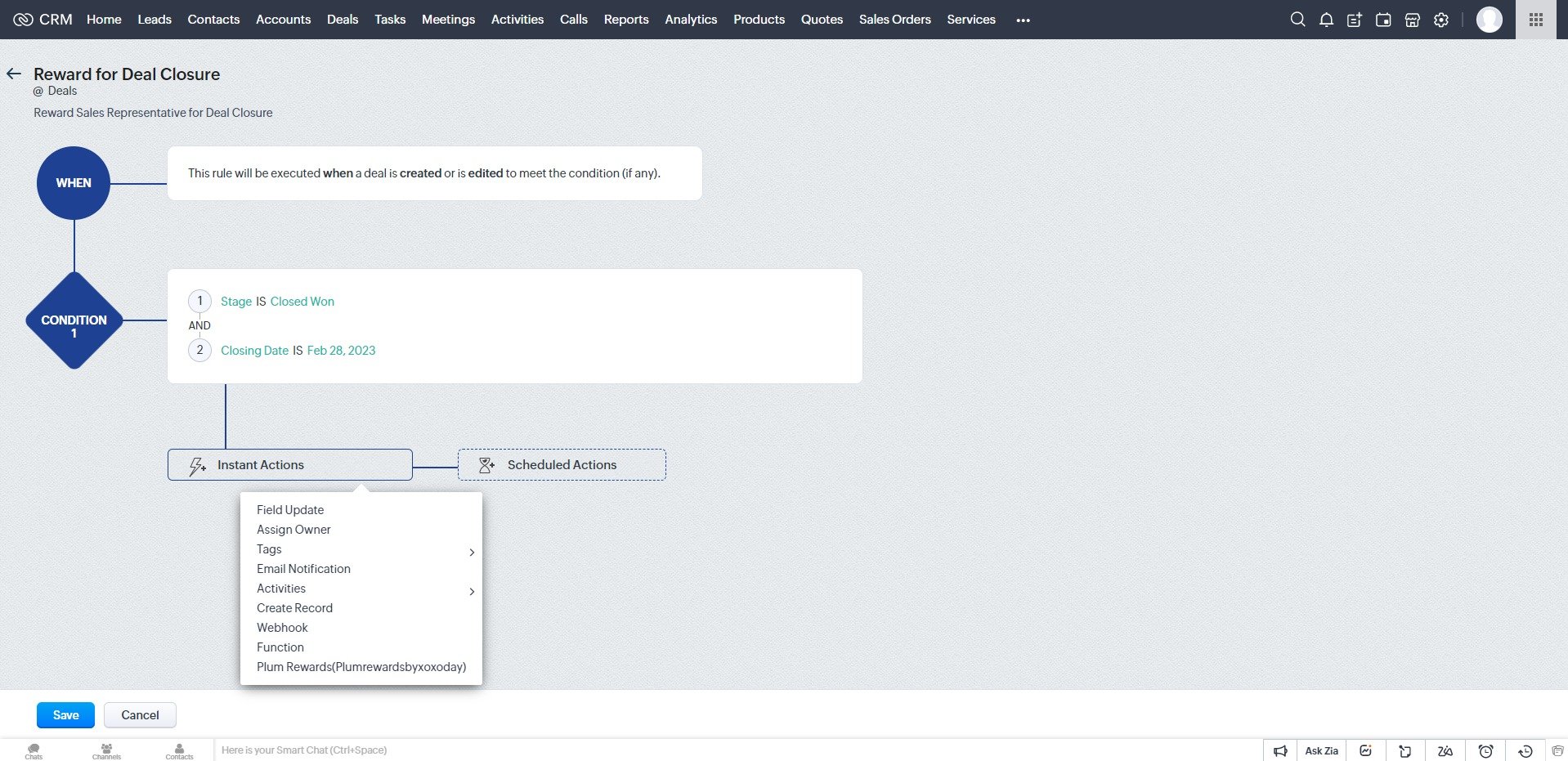
​

<img src="https://mintcdn.com/plum/zXbsSEper5I-0r-9/images/intercom/help-center-integrations-zoho-crm-automation-workflow-rules-9423153/spaces_-MOeXh7erUO5h_LVpN85_uploads_vr14Rbh8fTCxyL68bglY_Untitled__14_.jpg?fit=max&auto=format&n=zXbsSEper5I-0r-9&q=85&s=856faab63f7d94dc16f5129134926509" alt="" width="1918" height="931" data-path="images/intercom/help-center-integrations-zoho-crm-automation-workflow-rules-9423153/spaces_-MOeXh7erUO5h_LVpN85_uploads_vr14Rbh8fTCxyL68bglY_Untitled__14_.jpg" />

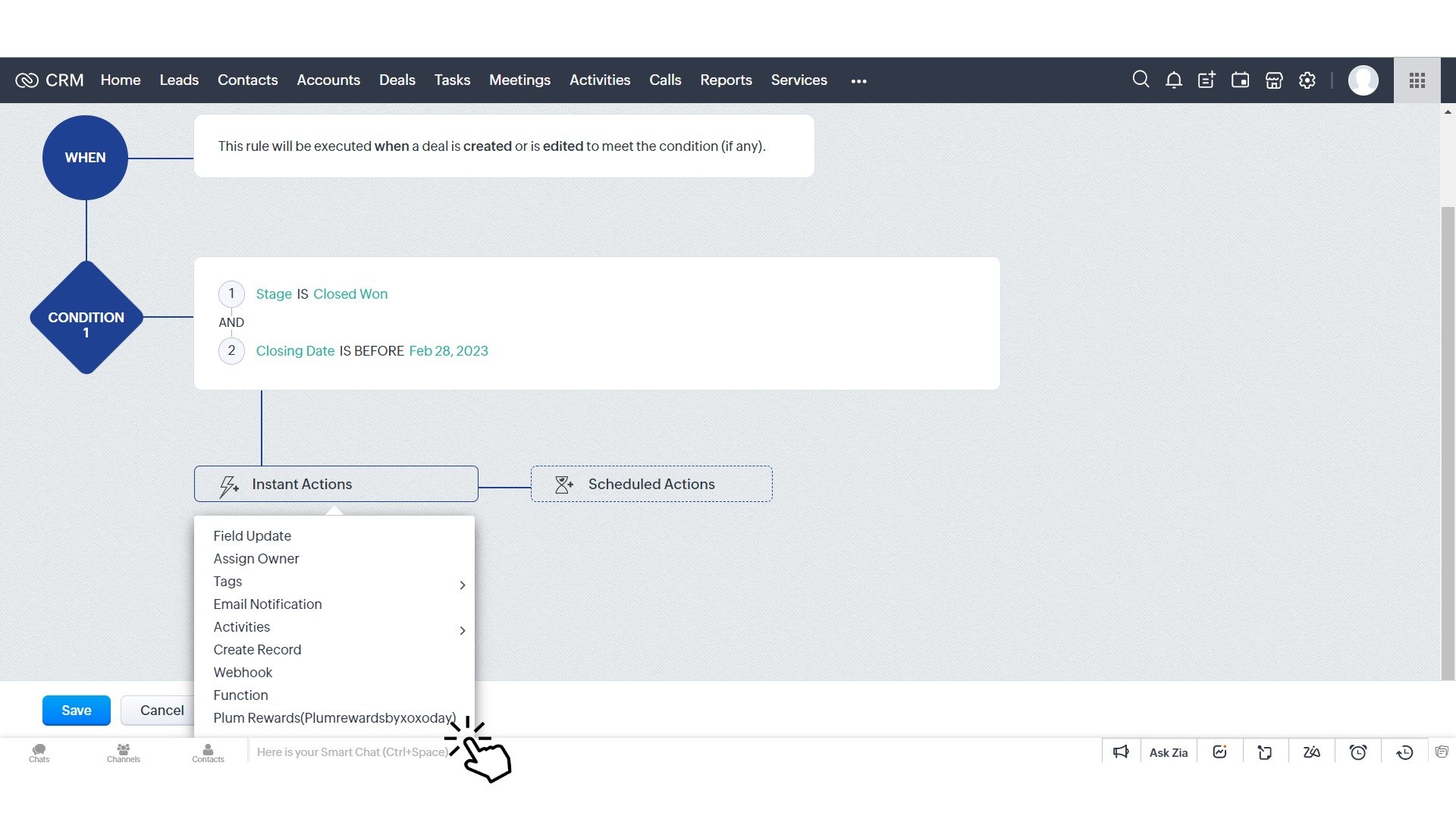
STEP 4: SET PLUM REWARDS AS ACTION
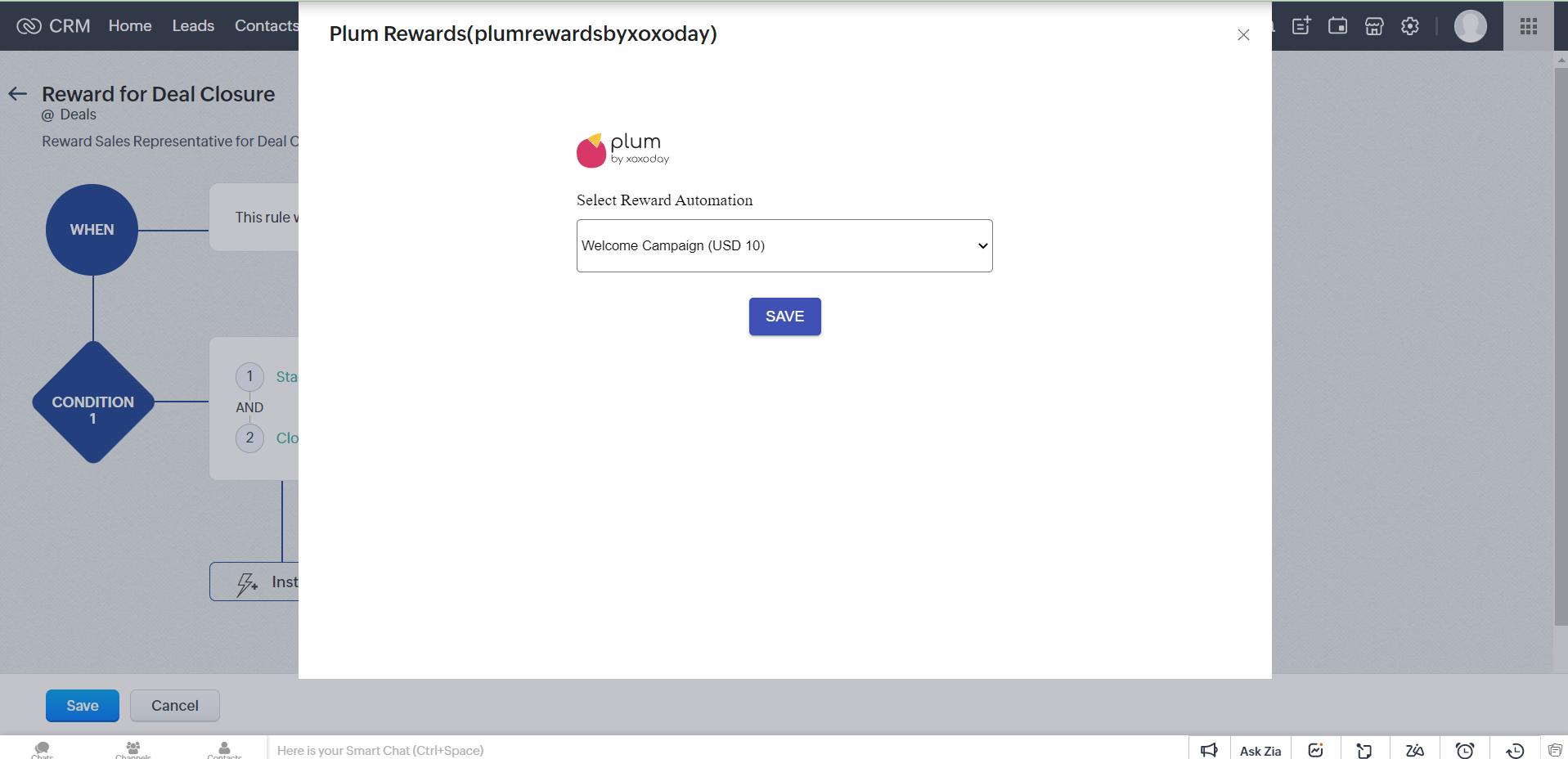
Select **Instant Actions > Choose Plum Rewards** (PlumrewardsbyXoxoday).
<img src="https://mintcdn.com/plum/zXbsSEper5I-0r-9/images/intercom/help-center-integrations-zoho-crm-automation-workflow-rules-9423153/spaces_-MOeXh7erUO5h_LVpN85_uploads_K0JTpRsIRktN7JEFoMEX_Zoho_CRM_Automation_Workflow_-_Select_Plum__1_.jpg?fit=max&auto=format&n=zXbsSEper5I-0r-9&q=85&s=f7715af37cadb7137340c108c590065d" alt="" width="1920" height="1080" data-path="images/intercom/help-center-integrations-zoho-crm-automation-workflow-rules-9423153/spaces_-MOeXh7erUO5h_LVpN85_uploads_K0JTpRsIRktN7JEFoMEX_Zoho_CRM_Automation_Workflow_-_Select_Plum__1_.jpg" />

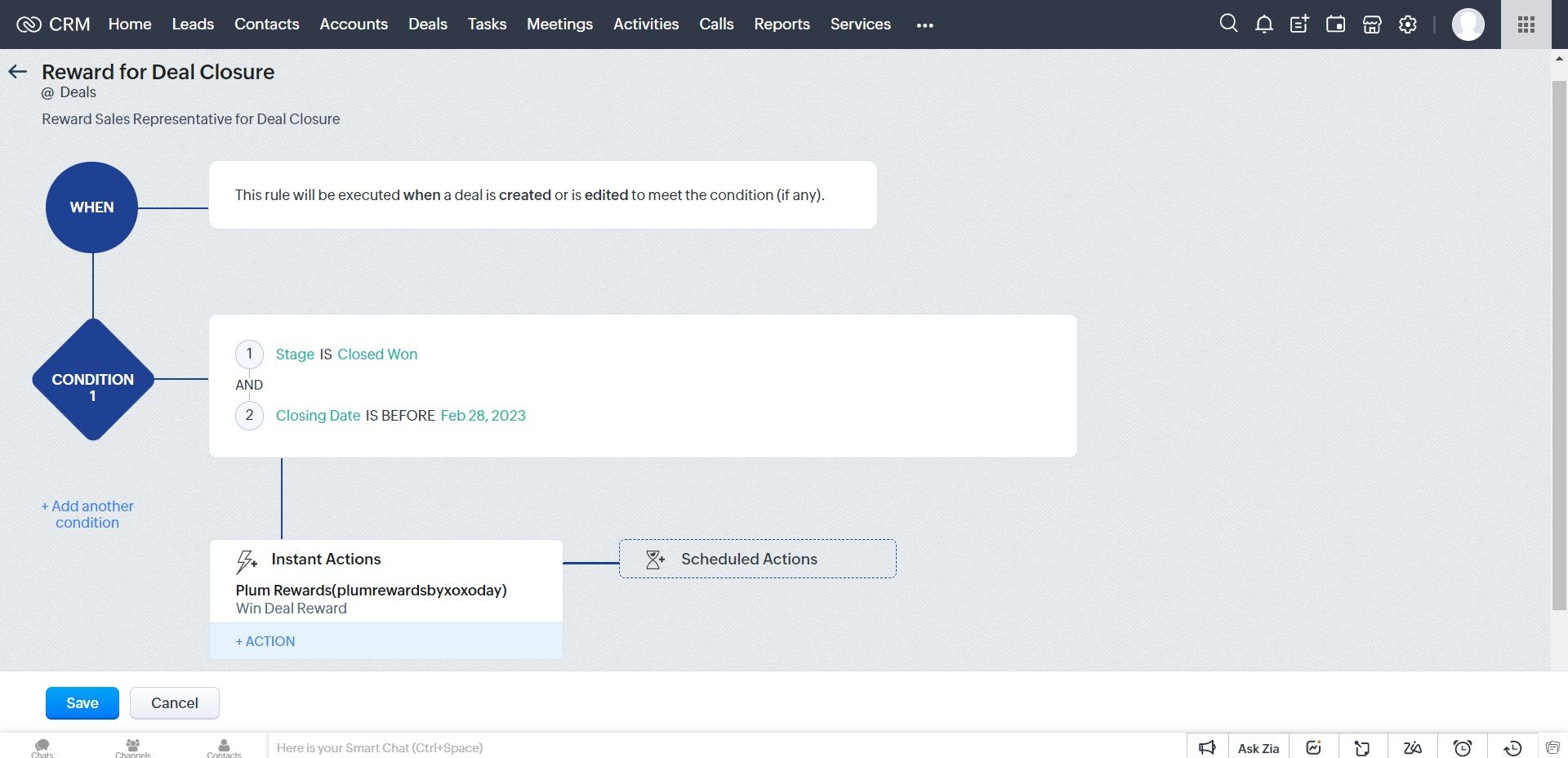
Select the reward Automation that you created in Xoxoxday Plum.\*\*​

<img src="https://mintcdn.com/plum/zXbsSEper5I-0r-9/images/intercom/help-center-integrations-zoho-crm-automation-workflow-rules-9423153/Untitled__15_.png?fit=max&auto=format&n=zXbsSEper5I-0r-9&q=85&s=106ba1f7002cff97cb1eeced5931dd72" alt="" width="1917" height="928" data-path="images/intercom/help-center-integrations-zoho-crm-automation-workflow-rules-9423153/Untitled__15_.png" />

<img src="https://mintcdn.com/plum/zXbsSEper5I-0r-9/images/intercom/help-center-integrations-zoho-crm-automation-workflow-rules-9423153/spaces_-MOeXh7erUO5h_LVpN85_uploads_OOemH5n6k7PGU4qTPfV8_Untitled__16_.jpg?fit=max&auto=format&n=zXbsSEper5I-0r-9&q=85&s=56655c1b059756cd31baa05564fd7264" alt="" width="1920" height="928" data-path="images/intercom/help-center-integrations-zoho-crm-automation-workflow-rules-9423153/spaces_-MOeXh7erUO5h_LVpN85_uploads_OOemH5n6k7PGU4qTPfV8_Untitled__16_.jpg" />

After selecting the automation, Name your custom action.
<img src="https://mintcdn.com/plum/zXbsSEper5I-0r-9/images/intercom/help-center-integrations-zoho-crm-automation-workflow-rules-9423153/spaces_-MOeXh7erUO5h_LVpN85_uploads_jMAjink6x2WdZImMoFuR_Untitled__17_.jpg?fit=max&auto=format&n=zXbsSEper5I-0r-9&q=85&s=b41af6f77a67dc434dbd6eb3334c019b" alt="" width="1920" height="928" data-path="images/intercom/help-center-integrations-zoho-crm-automation-workflow-rules-9423153/spaces_-MOeXh7erUO5h_LVpN85_uploads_jMAjink6x2WdZImMoFuR_Untitled__17_.jpg" />

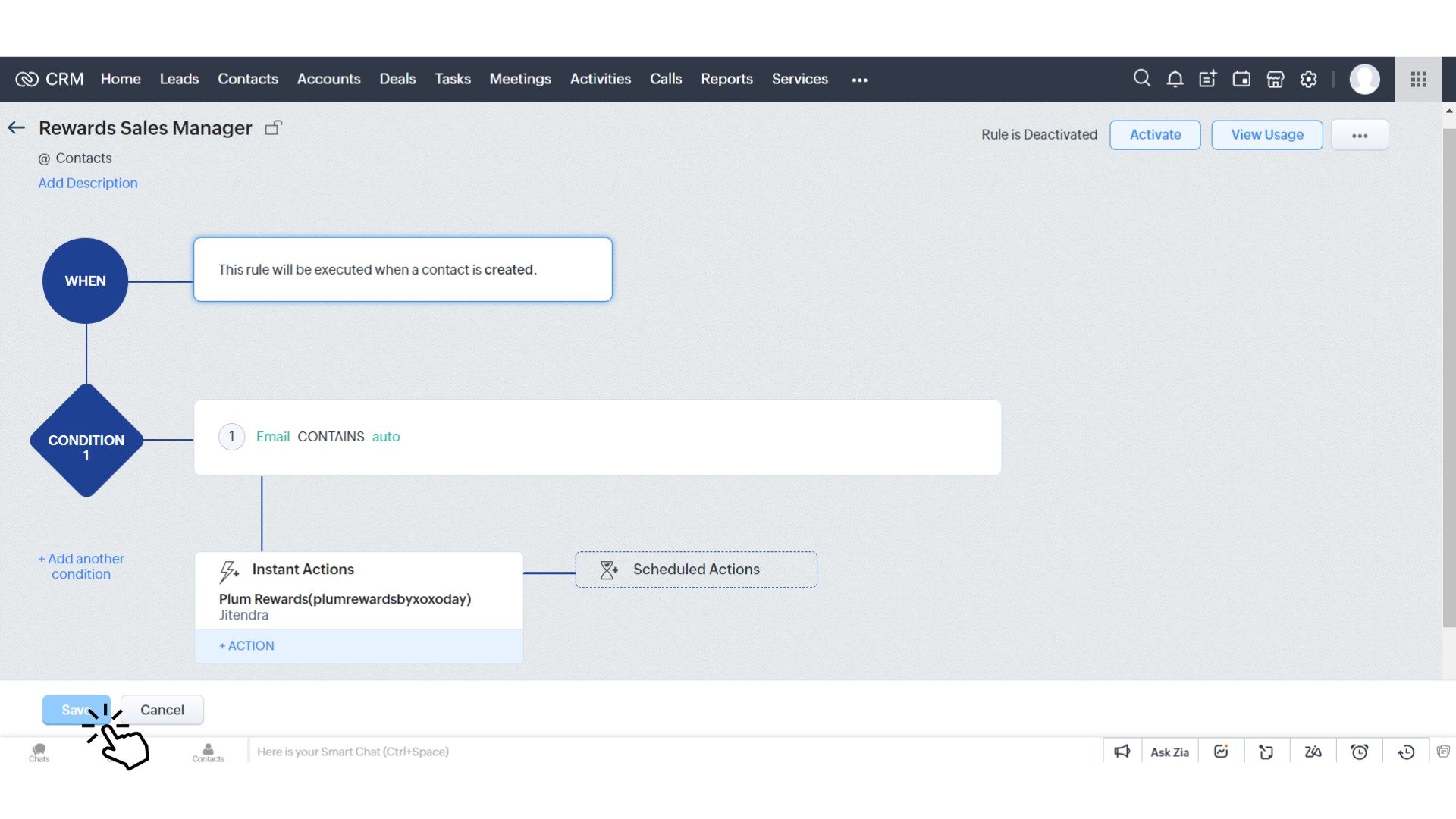
Click on ‘Save’\*\* to save the rule.

<img src="https://mintcdn.com/plum/zXbsSEper5I-0r-9/images/intercom/help-center-integrations-zoho-crm-automation-workflow-rules-9423153/spaces_-MOeXh7erUO5h_LVpN85_uploads_3w3rdB1Z8Sl2qvZBMxLu_Zoho_CRM_Automation_Workflow_-_Save_Automation__1_.jpg?fit=max&auto=format&n=zXbsSEper5I-0r-9&q=85&s=98b755af26a9b5e86b994a3482fe05de" alt="" width="1920" height="1080" data-path="images/intercom/help-center-integrations-zoho-crm-automation-workflow-rules-9423153/spaces_-MOeXh7erUO5h_LVpN85_uploads_3w3rdB1Z8Sl2qvZBMxLu_Zoho_CRM_Automation_Workflow_-_Save_Automation__1_.jpg" />

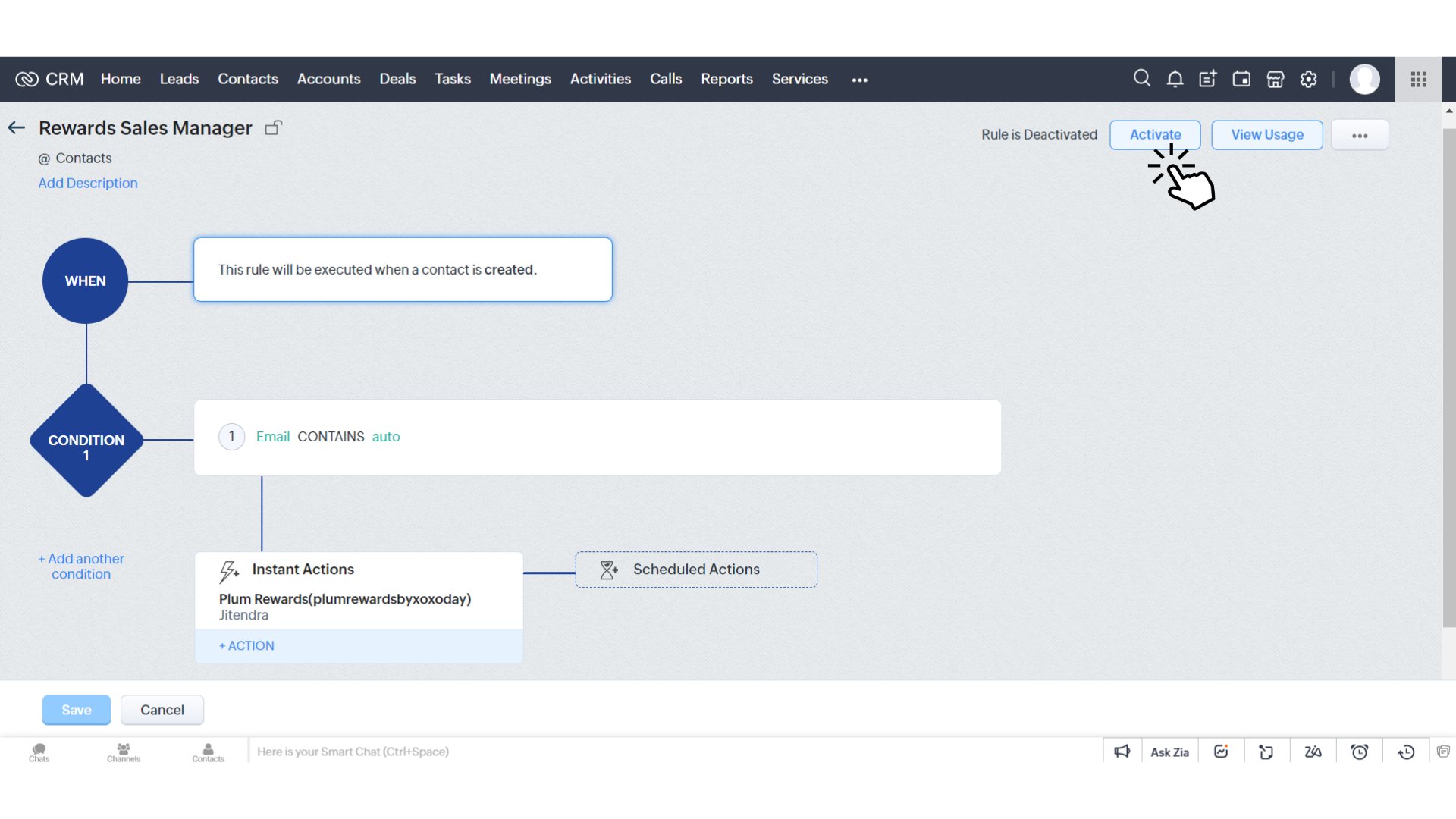
By default, the rules are not active. Click on **‘Activate’** to start your rewarding workflow rules.
<img src="https://mintcdn.com/plum/zXbsSEper5I-0r-9/images/intercom/help-center-integrations-zoho-crm-automation-workflow-rules-9423153/33d3907-image.png?fit=max&auto=format&n=zXbsSEper5I-0r-9&q=85&s=43ce65de5b9d273f4af44510dc8760dc" alt="" width="1920" height="1080" data-path="images/intercom/help-center-integrations-zoho-crm-automation-workflow-rules-9423153/33d3907-image.png" />