> ## Documentation Index
> Fetch the complete documentation index at: https://help-plum.xoxoday.com/llms.txt
> Use this file to discover all available pages before exploring further.
# Dashboard
This article outlines the key components and modules on the modules Admin Portal, helping administrators navigate the system effectively.
## Dashboard Overview
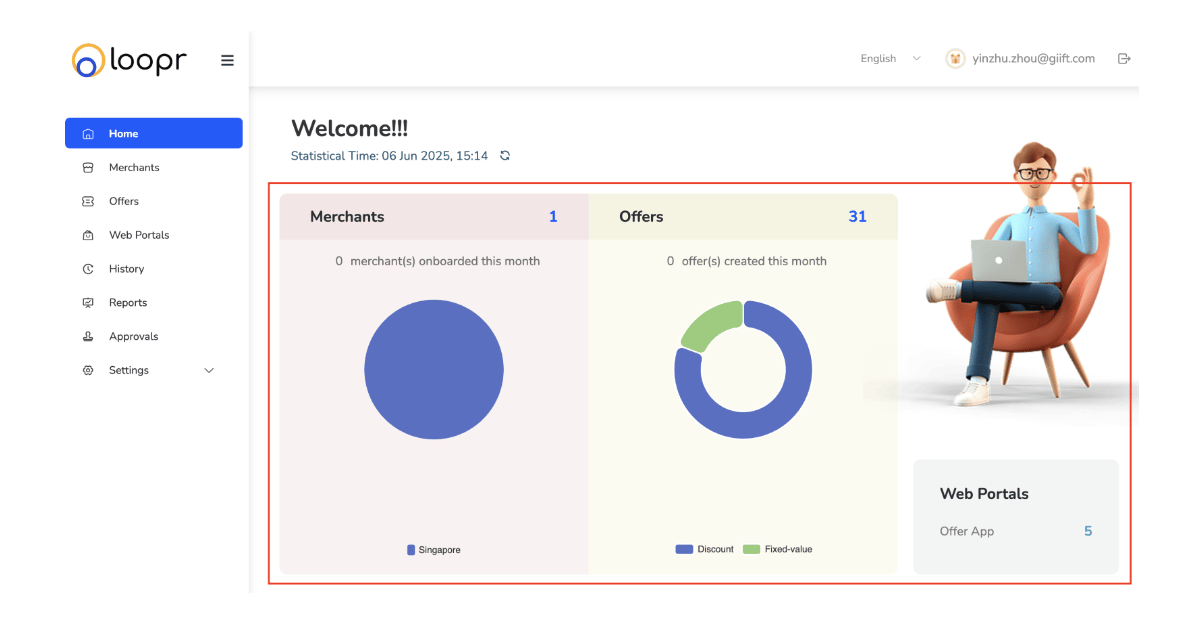
Upon successful login, the admin is presented with a Dashboard summarising key insights and statuses.
***
## 1.1 Merchant Information (Pie Chart)
* Displays a breakdown of merchants by countries
* Helps track the geographic distribution of partner merchants
***
## 1.2 Vouchers Information (Pie Chart)
* Shows a breakdown of vouchers by offer type
* Useful for understanding which types of offers are most common
***
## 1.3 Web Portals
* Offer Apps
 ***
## 1.4 Important Reminder Section
Stay on top of urgent or pending actions with this live summary:
* Expired Merchants – List of merchants whose validity has lapsed
* Expiring Merchants in 30 days – Merchants nearing their expiration date
* Expired Offers – Offers that are no longer active
* Expiring Offers in this year – Offers set to expire in the current year
* To Be Reviewed – Offers or merchants pending admin review or approval
***
## 1.4 Important Reminder Section
Stay on top of urgent or pending actions with this live summary:
* Expired Merchants – List of merchants whose validity has lapsed
* Expiring Merchants in 30 days – Merchants nearing their expiration date
* Expired Offers – Offers that are no longer active
* Expiring Offers in this year – Offers set to expire in the current year
* To Be Reviewed – Offers or merchants pending admin review or approval
 ***
## Platform Modules
The intuitive interface is organized into core modules that help you efficiently manage your tasks, based on your user role. Each module is accessible through the left-hand navigation menu and is tailored for a streamlined workflow.
* **Merchants: Manage merchant accounts and profiles. Admins use this module to onboard, approve, and monitor merchants.**
* Add and edit merchant details
* Track merchant activity and status
* Assign offers and stores to merchants
* **Offers: Create and manage promotional offers and discounts. Merchants and Admins can customize, schedule, and monitor offers here.**
* Create new offers with templates
* Customize branding, validity, and types
* Track active, expired, and upcoming offers
* **Customers: View and manage customer profiles, engagement, and redemption histories.**
* Access customer details and preferences
* Monitor offer redemptions and activity
* Segment customers for targeted promotions
* **Stores: Manage physical and online store locations linked to merchants and offers.**
* Add and update store information
* Link offers to specific stores for localized promotions
* Manage store operational details
* **History: Track past activities, transactions, and offer redemption logs for auditing and review.**
* View detailed logs of offer redemptions
* Monitor customer interactions over time
* Review activity history
* **Reports: Access comprehensive analytics and performance data to optimize campaigns and measure ROI.**
* Generate reports on offer performance
* Analyze customer engagement trends
* Export data for deeper insights
* **Web Portals: Configure customer-facing portals where offers are displayed and redeemed.**
* Customize portal appearance and branding
* Publish offers across portals and regions.
* Manage portal access and navigation
* **Approvals: Manage workflow approvals for offers based on the user roles – Admin, Checker and Maker.**
* Review and approve new offers
* Track approval status and history
* **Settings: Configure account, user roles, subscription, user feedback and password.**
* Manage user roles and access control
* Configure subscription and password
***
## Platform Modules
The intuitive interface is organized into core modules that help you efficiently manage your tasks, based on your user role. Each module is accessible through the left-hand navigation menu and is tailored for a streamlined workflow.
* **Merchants: Manage merchant accounts and profiles. Admins use this module to onboard, approve, and monitor merchants.**
* Add and edit merchant details
* Track merchant activity and status
* Assign offers and stores to merchants
* **Offers: Create and manage promotional offers and discounts. Merchants and Admins can customize, schedule, and monitor offers here.**
* Create new offers with templates
* Customize branding, validity, and types
* Track active, expired, and upcoming offers
* **Customers: View and manage customer profiles, engagement, and redemption histories.**
* Access customer details and preferences
* Monitor offer redemptions and activity
* Segment customers for targeted promotions
* **Stores: Manage physical and online store locations linked to merchants and offers.**
* Add and update store information
* Link offers to specific stores for localized promotions
* Manage store operational details
* **History: Track past activities, transactions, and offer redemption logs for auditing and review.**
* View detailed logs of offer redemptions
* Monitor customer interactions over time
* Review activity history
* **Reports: Access comprehensive analytics and performance data to optimize campaigns and measure ROI.**
* Generate reports on offer performance
* Analyze customer engagement trends
* Export data for deeper insights
* **Web Portals: Configure customer-facing portals where offers are displayed and redeemed.**
* Customize portal appearance and branding
* Publish offers across portals and regions.
* Manage portal access and navigation
* **Approvals: Manage workflow approvals for offers based on the user roles – Admin, Checker and Maker.**
* Review and approve new offers
* Track approval status and history
* **Settings: Configure account, user roles, subscription, user feedback and password.**
* Manage user roles and access control
* Configure subscription and password